

Navigating Supervisor Approvals Remotely Using the Contractor's Desk API

The Operational Cost of Waiting for Field Authorizations
When your technicians are stuck waiting on a job site for a critical sign-off, handling supervisor approvals from anywhere with the Contractor's Desk API becomes the most effective way to eliminate operational bottlenecks. A technician standing idle next to a dismantled HVAC system is actively draining your daily revenue. This frustration compounds when field teams need immediate authorization for high-ticket items, such as commercial rooftop unit part orders, but the supervisor is tied up on another job site or driving across town. The traditional method of playing phone tag or forcing an owner to drive back to the physical office simply does not work for a growing service business.
Every minute a technician waits for a green light is a minute they cannot spend diagnosing the next call. These delays create a ripple effect across your entire dispatch board. Customers get pushed back, technicians rack up unbillable hours, and the overall efficiency of your operation plummets. Physical office returns and missed phone calls are expensive operational hurdles that limit how many jobs your team can complete in a single day.
The hidden costs of delayed field authorizations include:
• Wasted labor hours: Paying technicians their full hourly rate while they sit in their vans waiting for a response.
• Rescheduled appointments: Pushing afternoon calls to the next day because morning jobs stalled out pending approval.
• Frustrated customers: Homeowners and facility managers who expect fast repairs but are told they have to wait for an owner's signature.
• Inventory confusion: Parts ordered outside of the standard workflow because a technician grew impatient and bypassed the system.
Automated, remote authorization is the modern solution to this widespread industry problem. By leveraging software integrations, owners can maintain strict financial oversight without needing to be physically present at a desk. Implementing these workflows is a core component of essential contractor support services. When you upgrade your infrastructure with proper business systems and software optimizations, you empower your team to move quickly while keeping administrative control firmly in your hands.
Understanding the Mechanics of API-Driven Authorization
An API, or Application Programming Interface, acts as a digital bridge between two different software systems. In a field service environment, an API approval workflow takes the data entered by a technician on a job site and instantly securely transmits it to a decision-maker's device. Instead of relying on manual emails or text messages that easily get lost in the shuffle, the API creates a direct, trackable line of communication between the field application and the supervisor's dashboard.
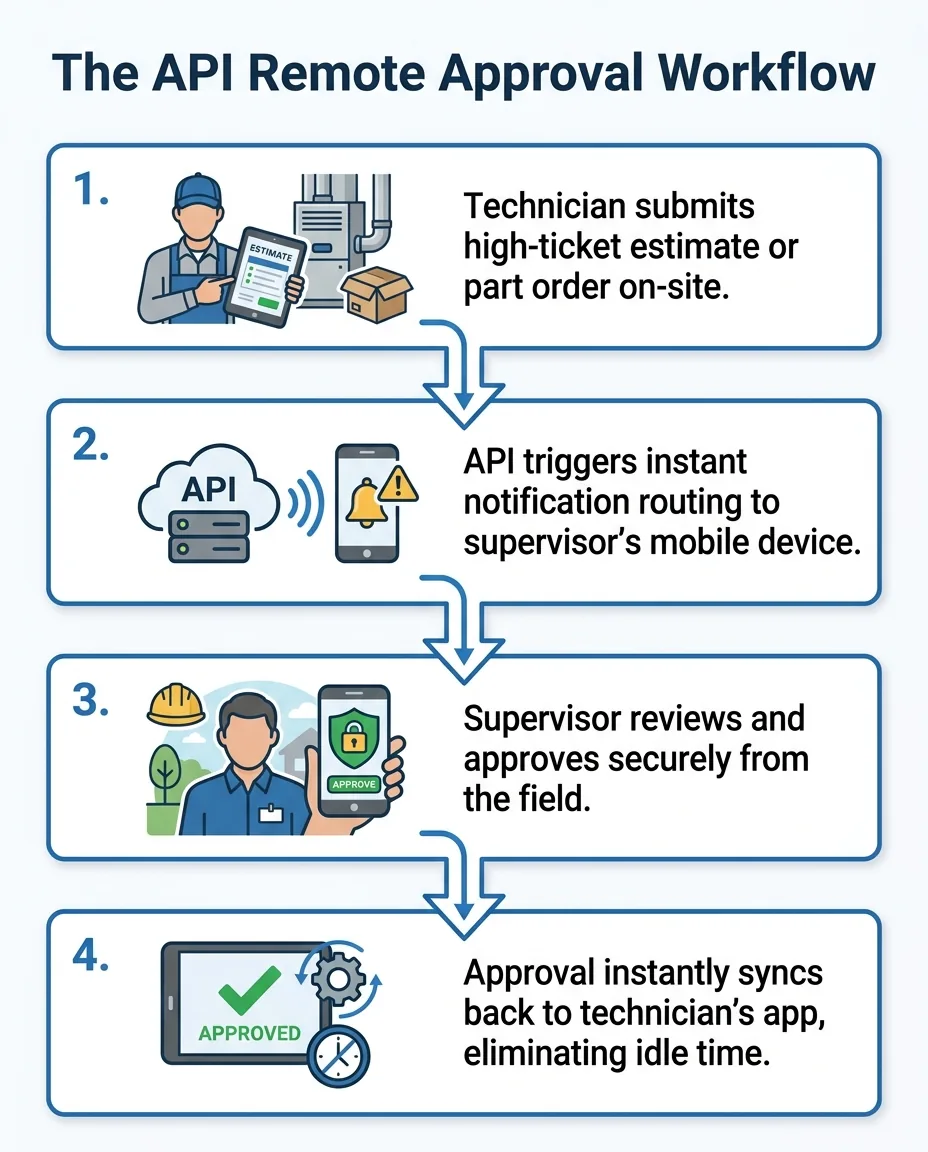
When dealing with major equipment repairs, the stakes are high. The Contractor's Desk API is specifically designed to route these high-ticket requests—like expensive commercial rooftop unit part orders—directly to a supervisor's mobile phone or tablet. The moment a technician submits the estimate or part requisition, the API triggers an alert. The supervisor can review the exact specifications, check the margins, and tap a button to approve the request. That approval instantly syncs back to the technician's device, turning a process that used to take hours into a task that takes seconds.
This technology ensures that administrative control remains strictly with the business owner or designated manager, regardless of their physical location. You do not have to give technicians blanket permission to order expensive parts just to keep jobs moving. The API enforces your customized business rules while providing the speed necessary to maintain field efficiency. Establishing this kind of digital infrastructure is one of the most critical systems you need to scale a service business.
Moving Beyond Native App Features
Many field service applications come with basic permission settings, but these native features often fall short for complex operations. A standard app might allow you to set a maximum dollar limit for technician orders, but it rarely offers the nuanced control required for growing fleets. Basic apps force you into a one-size-fits-all box, which can either bottleneck your best technicians or expose you to unnecessary financial risk.
Robust API workflows move far beyond these basic limitations. APIs allow for conditional routing based on specific job types, customer profiles, or exact part requirements. For example, a standard residential capacitor replacement might process automatically, while a request for a commercial compressor routes directly to the senior operations manager.
• Approval Routing — Basic Native App Permissions: All requests go to a single central inbox. — API-Driven Workflow: Requests route to specific managers based on job type.
• Speed of Notification — Basic Native App Permissions: Requires manual app refreshing to see updates. — API-Driven Workflow: Instant push notifications to targeted mobile devices.
• Customization — Basic Native App Permissions: Rigid, predefined approval tiers. — API-Driven Workflow: Highly customizable conditional logic and rules.
• Syncing — Basic Native App Permissions: Often requires manual syncing by the technician. — API-Driven Workflow: Real-time synchronization across all platforms.
By upgrading to an API-driven model, you build a customized safety net that protects your margins without slowing down your frontline workers.

Keeping Technicians Moving When Call Volumes Spike
Automated mobile approvals are not just about convenience; they are a vital survival tool during periods of extreme operational stress. When technicians do not have to stand idle at a job site waiting for an answer, they can close out tickets faster and move on to the next customer. This compound effect of saved time drastically increases the total number of calls a single technician can complete in a day.
This efficiency becomes critical when regional weather patterns shift. When extreme heat waves hit the area, emergency calls skyrocket. During peak summer emergency dispatch, dispatchers are overwhelmed, and owners are often out in the field helping to run calls or handle complex diagnostics. During these spikes, it is physically impossible for an owner to return to the office to review estimates without severely impacting the company's response times. A remote API workflow ensures that even if the owner is in an attic across town, they can review and approve a major repair with a few taps on their phone.
Dispatch shortages only compound the chaos of high call volumes. One company experienced this firsthand at the end of 2023 when they suffered a sudden, unexpected loss of a dispatcher and call taker during a busy winter season. Without dedicated personnel to manually chase down approvals and route information, operations ground to a halt until a professional support team took over the full-time call handling and dispatching duties. Streamlined software workflows mitigate this kind of administrative chaos by removing the manual middleman.
How remote approvals support the dispatch board:
• Fluid scheduling: Dispatchers can confidently assign the next call knowing the current job won't stall out indefinitely.
• Reduced phone traffic: Technicians stop calling the office repeatedly to ask if their estimate has been signed off.
• Faster material runs: Approved part orders are instantly sent to the supply house, allowing the technician to pick up materials without delay.
• Maintained momentum: Technicians stay in a productive mindset rather than growing frustrated while waiting in their trucks.
By keeping the dispatch board fluid, remote approvals ensure your business can handle seasonal surges without burning out your staff or dropping the ball on customer service.
Steps to Implement Contractor's Desk API for Remote Approvals
Setting up an automated authorization system requires a strategic approach to ensure data flows correctly between the field and the back office. Following a structured implementation process guarantees that critical requests never fall through the cracks.
1. Identify specific authorization limits and trigger events.
Before touching any software, you must define your business rules. Determine exactly which scenarios require supervisor intervention. For instance, you might decide that any standard repair under a specific threshold is automatically approved, while commercial rooftop unit part orders always require manual sign-off. Document these thresholds clearly so they can be programmed into the system.
2. Configure the API endpoints within the Contractor's Desk environment.
Access the administrative dashboard to set up the digital routing. You will need to map the API endpoints so that when a field technician hits "submit" on a restricted item, the system knows exactly where to send the data. Ensure that the routing points directly to the correct mobile devices of your designated supervisors or owners.
3. Test the notification system thoroughly.
Never roll out a new workflow without rigorous testing. Create mock estimates and part requests from a technician's profile to verify that the API triggers immediate push notifications. Check that the supervisor's mobile device receives the alert instantly, and confirm that the approval syncs back to the field app without delay or data corruption.
4. Train field technicians on the new submission process.
Technology only works if your team knows how to use it. Hold a brief training session to show technicians exactly how to submit an API-linked request from their existing field service interface. Explain what they will see on their screen while the request is pending, and establish clear expectations for how long an approval typically takes.
By following these steps, you create a seamless, reliable system that protects your margins while accelerating your daily operations.
Pairing API Workflows with Comprehensive Back-Office Automation
While APIs are incredibly effective at handling the technical routing of approvals, software alone cannot run your business. The overall financial and operational organization of a service company requires robust, human-led back-office support. An API can send an approval request to your phone, but it takes an organized back office to ensure the parts are properly logged, the invoices are accurate, and the customer is billed correctly.
Delegating routine tasks is the secret to maximizing the value of your software. When you hand off daily dispatching, call handling, and bookkeeping to professionals, supervisors are freed from the minutiae. Instead of answering dozens of minor questions, an owner can focus solely on high-level authorizations and business strategy. One HVAC company experienced this transformation during a busy summer season; they needed urgent help managing incoming calls and messy accounting. By partnering with a dedicated team to handle dispatching and organize their finances, calls were managed efficiently, accounting became precise, and the owners regained control of their time.
Working with a partner that understands the nuances of HVAC operations makes all the difference. Contractor In Charge brings deep expertise in back-office automation, ensuring owners maintain complete oversight without being physically chained to a desk. This level of support transforms a good software tool into a comprehensive business strategy.
A strong back-office partnership provides:
• Accurate financial tracking: Ensuring every approved part order is properly coded to the correct job for accurate margin reporting.
• Seamless customer communication: Keeping homeowners informed if a specialized part will delay the final repair.
• Overflow management: Capturing every inbound call even when peak summer emergency dispatch stretches the team thin.
• Organized records: Maintaining a clean digital paper trail of every remote approval for future auditing.
By pairing smart software with remote back office solutions, you create an operational ecosystem that communicates clearly, tracks finances accurately, and scales effortlessly.
Frequently Asked Questions About Remote API Approvals
How do remote API approvals work for HVAC contractors?
Remote API approvals work by acting as a secure digital bridge between a technician's field app and a supervisor's mobile device. When a technician requests authorization for a major repair, the API instantly routes that specific data to the manager. The manager can review the details and approve the request from anywhere, which immediately updates the technician's screen so the job can continue without delay.
How can supervisors authorize high-ticket parts from the field?
Supervisors authorize high-ticket parts by receiving automated push notifications triggered by the API workflow directly on their smartphones or tablets. They can open the notification, review the exact part specifications and job details, and tap an approval button. This eliminates the need to drive back to the office or log into a desktop computer to sign off on commercial rooftop unit part orders.
Can I approve field service estimates securely from my mobile device?
Yes, you can securely approve field service estimates using encrypted API workflows designed specifically for mobile devices. The data transmitted between the field application and your device is protected, ensuring that financial information and customer details remain confidential. This allows you to maintain strict oversight over your margins without compromising data security.
What is an API approval workflow in field service management?
An API approval workflow is an automated digital process that uses an Application Programming Interface to enforce business rules across different software platforms. In field service, it is primarily used to catch restricted actions—like large estimates or complex part orders—and route them to a designated authority for review. It replaces manual phone calls and paperwork with instant digital synchronization.
How does automated authorization reduce technician idle time?
Automated authorization reduces idle time by delivering decisions to the field in a matter of seconds rather than hours. Technicians no longer have to sit in their vans waiting for a callback or an email response from a busy manager. As soon as the mobile approval is granted, the technician can immediately proceed with the repair or order the necessary materials.
Maintain Strict Financial Oversight from Anywhere
API workflows fundamentally change how a service business operates by eliminating the need for physical office visits just to secure critical sign-offs. By embracing this technology, you guarantee that your technicians stay productive, jobs keep moving forward, and customers receive the fast service they expect, even during peak summer emergency dispatch periods.
You do not have to sacrifice control to achieve speed. Navigating supervisor approvals remotely using the Contractor's Desk API allows you to protect your margins while freeing yourself from the office desk. If you are tired of being the bottleneck in your own company, it is time to explore advanced business system optimizations and integrated back-office support to finally regain your time and scale with confidence.