

Leveraging the Contractor's Desk API to Automate Action Items Without Losing Oversight


The Hidden Cost of Notification Spam in Dispatch Operations
Your dispatch board is constantly flashing with system updates, but your team is still struggling to prioritize the calls that actually matter. Using the Contractor's Desk API to automate action items while keeping control is the definitive way to solve this operational disconnect. Modern field service operations rely heavily on integrated back office solutions to keep technicians, dispatchers, and management completely connected. However, when these integrations are simply turned on without a strategic plan, the result is often an overwhelming flood of automated alerts.
To fix this, you need intentional business systems and software optimizations that filter the noise, alongside robust back office solutions that empower your team to focus on revenue-generating tasks.
When business systems and software optimizations are poorly configured, every minor update—from a technician clocking in to a routine inventory sync—triggers a visible notification. Dispatchers and call takers quickly become desensitized to this constant buzzing and flashing. This phenomenon, known as alert fatigue, leads directly to critical service requests and emergency cancellations being overlooked in the chaos. The key to restoring operational balance lies in intentionally configuring the Contractor's Desk API to route only necessary action items to the main dispatch board, while handling routine data transfers quietly in the background.
The cascading effects of notification spam include:
• Missed emergencies: High-priority no-heat or active leak calls get buried under dozens of routine status updates.
• Increased dispatcher burnout: The mental load of constantly clearing irrelevant alerts exhausts your team before the afternoon rush even begins.
• Delayed technician routing: When the board is cluttered, dispatchers take longer to find the right technician for the next job.
• Data blindness: Important operational metrics are ignored because the system is perceived as "crying wolf."
By taking control of your API configurations, you transform your dispatch software from a noisy distraction into a precision tool.
Why Unfiltered API Triggers Paralyze Your Dispatch Team
The problem: Alert fatigue causes significant context-switching delays in high-volume dispatch environments. Every time a dispatcher stops routing a complex HVAC installation to clear an automated alert about a routine parts order, they lose focus. Treating every system update as an urgent notification degrades the overall quality of dispatcher response.
The cause: Most field service management systems default to sending a notification for every single event logged through an integration. Without proper API action item mapping and notification routing, the system creates noise rather than clarity. The software assumes all data is equally important, which is never true in a fast-paced plumbing or heating operation. A critical shortage of dispatchers or call takers only exacerbates this problem, making efficient, quiet systems absolutely mandatory for survival.
We see this precise scenario play out in the real world. At the end of 2023, during a busy winter season, one home service company faced a critical shortage of dispatchers and call takers. The leadership team was entirely unable to handle the sheer volume of calls and system alerts. By stepping in to take over full-time call handling and dispatching duties—and utilizing streamlined back-office processes—Contractor in Charge enabled the company to stabilize, improve business operations significantly, and return to a path of growth.
The solution: Implementing strict filtering rules at the API level stops the bleeding. By categorizing data before it ever hits the dispatch screen, you protect your team's attention.
• Every GPS ping generates a pop-up alert. — Filtered API Setup: GPS data silently updates the map in the background.
• Routine maintenance reminders flood the daily board. — Filtered API Setup: Reminders are batched into a single morning report.
• Customer cancellations get lost in the noise. — Filtered API Setup: Cancellations trigger a high-priority, color-coded alert.
• Dispatchers spend 20% of their day clearing notifications. — Filtered API Setup: Dispatchers spend 100% of their time managing active jobs.
Categorizing Alerts: Immediate Action vs. Silent Logging
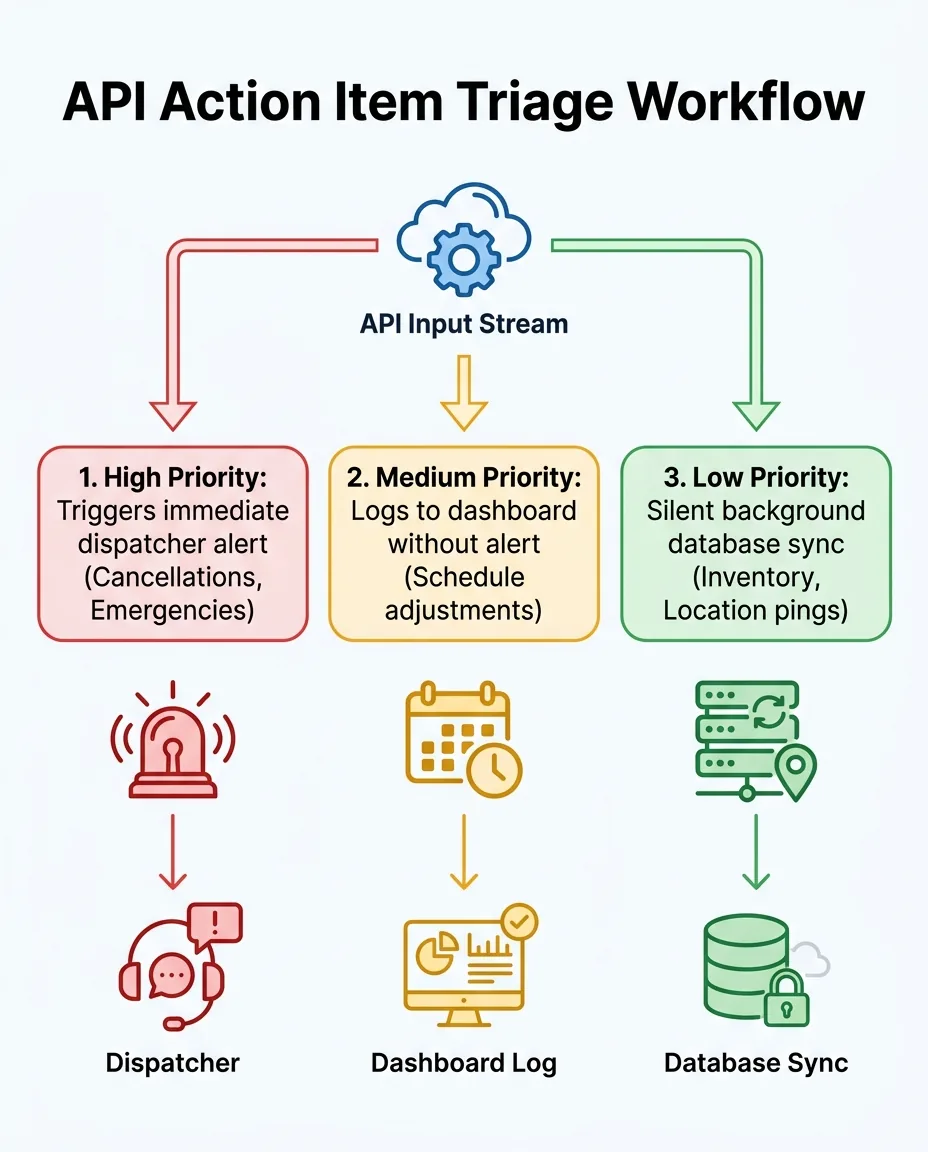
Not all data transfers require human intervention. In fact, the vast majority of API communications should simply update your database silently. Establishing clear triage rules ensures that only high-priority anomalies trigger a visible alert. Evaluating the best FSM software for HVAC and plumbing companies often comes down to how granular these notification settings can be configured within the Contractor's Desk API.
Silent logging maintains a perfect audit trail without interrupting the workflow of the dispatch team. If a manager needs to see exactly when a technician arrived or when a part was ordered, the data is safely stored in the system. The dispatcher, however, never had to click "acknowledge" to make it happen.
Here is how to categorize your API data flows:
1. Audit your current notifications: Look at every alert your dispatchers receive in a typical week and identify the ones they immediately dismiss.
2. Define your emergency triggers: Isolate the specific events that require a dispatcher to drop everything and act.
3. Configure background pathways: Route all non-emergency data to update records silently.
4. Test the new workflows: Run the system in a staging environment to ensure critical alerts still break through.
Defining High-Priority Triggers
High-priority triggers are the events that directly impact your daily revenue, customer satisfaction, or technician safety. These absolutely must generate an immediate, unmissable alert on the dispatch board.
• Customer cancellations or emergency requests: If a homeowner calls to say their basement is flooding, the dispatcher needs to know instantly so they can reroute the nearest truck.
• Technician status changes indicating delays: If a technician is stuck on a job two hours past the expected completion time, an alert allows the dispatcher to proactively contact the next customer on the schedule.
• Failed payment captures: Immediate alerts on payment issues allow the office to resolve the problem while the technician is still on-site.
Implementing Background Data Syncs
Background syncs handle the operational heavy lifting. They keep your records perfectly accurate without demanding human attention.
• Routine inventory updates and location pings: When a technician uses a standard filter from their truck stock, the API should silently decrement the inventory count.
• Automated invoice generation logs: The creation of standard invoices should be logged for accounting purposes without pinging the dispatch board.
• Marketing attribution data: When a new lead enters the system, the source data should attach to the customer profile quietly.

Technical Workflows for the /api/action-items Endpoint
Properly configuring the /api/action-items endpoint within the Contractor's Desk API is essential for precise data routing. This specific endpoint acts as the central nervous system for your dispatch software, receiving payloads of data from external applications and deciding where that data needs to go. When mapped correctly, it eliminates redundant manual data entry across disparate systems.
Integrating AI CRM lead management tools through this endpoint ensures that new customer data is parsed intelligently. For example, when a new lead comes in from a web form, the AI CRM analyzes the request. It then sends a structured payload to the /api/action-items endpoint. If the request is a standard seasonal tune-up, the API logs it to a scheduling queue. If the AI detects phrases like "burst pipe" or "smells like gas," the API overrides the standard routing and forces a high-priority alert to the dispatcher.
Mapping custom fields correctly prevents default fallback notifications from spamming the main dispatch board. Many generic integrations fail because they push data into a "notes" field, triggering a generic "New Note Added" alert. By mapping data to specific fields (e.g., "Equipment Age" or "Preferred Callback Time"), the system updates the record cleanly. Testing the endpoint response payloads guarantees that the data structure matches your operational needs before you go live, ensuring your API action item mapping and notification routing works flawlessly under pressure.
Aligning Automation with Real-World HVAC and Plumbing Workflows
Generic API documentation rarely accounts for the nuances of HVAC and plumbing service routing. Standard IT developers might look at a service call as just another calendar event, but trade professionals know that a routine maintenance call and a no-heat emergency require completely different operational responses. Trade-specific workflows require automations that understand these critical differences.
Translating generic API capabilities into practical dispatch workflows requires specialized industry knowledge. For instance, if an API is set up to alert a dispatcher every time a part is placed on order, it might work fine for a small IT helpdesk. But for a plumbing company running thirty trucks, that same configuration will bury the dispatcher in hundreds of meaningless alerts by noon. The automation must be tailored to recognize that standard PVC fittings do not require an alert, but a specialized compressor order does.
Working with Contractor in Charge provides a distinct advantage here. Because of a deep understanding of trade-specific workflows, we ensure that API automations actually streamline operations rather than flooding teams with generic IT notification spam. Proper configuration means your software works the way your dispatchers actually think, anticipating their needs rather than adding to their workload. The Contractor's Desk API is powerful, but its true value is unlocked only when calibrated to the daily realities of the home service industry.
Stress-Testing Your API Integrations During Seasonal Spikes
The problem: Service request volumes spike dramatically during the first major summer heatwave or winter deep freeze. When temperatures in the region cross 100 degrees in July, or plummet below freezing in January, call volumes can easily quadruple overnight. Difficulty managing calls, dispatching, and accounting operations during these extreme weather peaks can cripple unprepared operations.
The cause: If your API integrations are not stress-tested, a sudden influx of data will cause the system to bottleneck. When every single incoming web request, voicemail transcription, and technician status update triggers an alert, dispatchers become paralyzed. They cannot physically clear the notifications fast enough to actually dispatch the trucks.
This is a common hurdle during extreme weather. During one particularly severe summer heatwave, a contractor experienced immense difficulty managing calls, dispatching, and accounting operations simultaneously. The sheer volume of requests was breaking their internal processes. By bringing in a dedicated external team that handled calls, dispatching, and accounting with strict organization and accuracy, they were able to weather the spike. The team provided spot-on numbers and valuable feedback, eventually becoming a trusted, long-term partner.
The solution: A well-configured API acts as a digital triage system, automatically routing non-emergency queries away from the main board. Integrating virtual customer service teams with your API ensures overflow calls are handled and logged without bottlenecking local dispatchers. Proper API action item mapping and notification routing ensures that even on the busiest day of the year, your board remains clean and actionable.
• Automated Request Queuing — Impact on Dispatch Operations: Holds non-emergency maintenance requests in a silent queue for later review.
• Virtual Team Integration — Impact on Dispatch Operations: Routes overflow calls to off-site agents who log data directly via the API.
• Emergency Override Tags — Impact on Dispatch Operations: Ensures true emergencies bypass the queue and flash immediately on the board.
• Batch Syncing — Impact on Dispatch Operations: Delays routine inventory and accounting syncs until off-peak hours.
Maintaining Human Oversight in an Automated System
The ultimate goal of leveraging the Contractor's Desk API is not to remove humans from the process, but to elevate their role. Automation should empower dispatchers by removing repetitive tasks, not by hiding critical operational data. When an action item is mapped correctly, the dispatcher no longer acts as a data-entry clerk; they become an operational strategist, managing the flow of the day based on clean, accurate information.
Strategic mapping allows managers to maintain full visibility through dashboards without being pinged for every minor event. The data is always there, accessible and organized, but it waits until it is needed. Regularly auditing API logs ensures that silent background processes are still functioning correctly. If a background sync fails, the system should generate a specific technical alert for management, rather than bothering the dispatch team.
A balanced system gives operations managers complete control without the paralyzing noise. By intentionally designing your API action item mapping and notification routing, you ensure that your technology serves your people. You retain total oversight of your business operations, while your dispatchers enjoy a focused, streamlined environment that allows them to provide exceptional service to your customers.
Frequently Asked Questions
How do you map action items in the Contractor's Desk API?
Mapping action items involves configuring the API endpoints to direct specific data payloads to designated fields within your dispatch software. You must identify the source data, assign it a priority level, and set rules that determine whether it triggers a visible alert or logs silently in the background.
How can HVAC companies prevent dispatch notification spam?
The most effective way to prevent spam is to disable default "alert all" settings in your software integrations. By establishing strict triage rules, you ensure that only high-priority events—like emergency calls or technician delays—create visible pop-ups, while routine updates happen quietly.
What triggers an API action item?
An API action item is triggered by any external event that sends a data payload to your software's endpoint. This can include a customer submitting a web form, a technician updating their GPS location, a payment processing gateway confirming a transaction, or an answering service logging a new call.
How do I integrate Contractor's Desk API with my existing CRM?
Integration requires authenticating the connection between your CRM and the API, then mapping the corresponding data fields. You will need to align customer names, addresses, and service histories so that when the CRM sends a payload to the /api/action-items endpoint, the dispatch software interprets it correctly without creating duplicate records.
Which dispatch alerts should be silenced versus prioritized in FSM software?
Prioritize alerts that require immediate human action, such as active leaks, no-heat emergencies, and sudden schedule cancellations. Silence alerts that involve routine operational data, such as standard inventory deductions, automated invoice generation, and regular GPS location pings from technician vehicles.
Ready to Streamline Your Dispatch Operations?
If your team is exhausted by endless notification spam, it is time to take control of your software integrations. By implementing structural advice on mapping API action items, you can balance automated routing with human oversight. Eliminate notification fatigue today and empower your dispatchers to focus on the calls that truly matter.