
Ultimate Checklist for ServiceTitan Best Practices for HVAC and Plumbing Companies

Why ServiceTitan Best Practices for HVAC and Plumbing Companies Make or Break Your Operations
Following ServiceTitan best practices for HVAC and plumbing companies is one of the fastest ways to close the gap between a chaotic operation and a consistently profitable one. But most contractors only scratch the surface of what the platform can actually do — leaving efficiency, appointment opportunities, and customer satisfaction on the table.
Here is a quick overview of the most important ServiceTitan best practices for HVAC and plumbing companies:
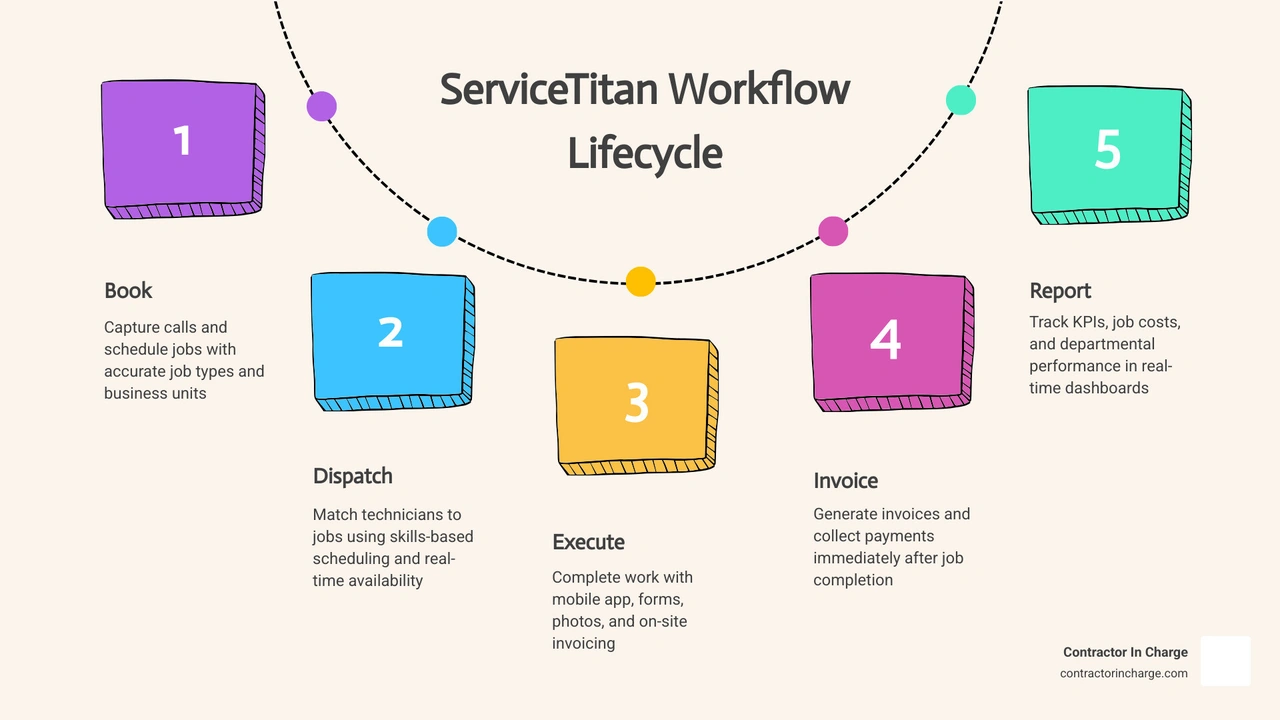
1. Set up Business Units and Job Types correctly — Separate your departments (Service, Install, Maintenance, Commercial) so you can track revenue, workflow volume, and performance by division.
2. Use required forms and inspection checklists — Trigger forms automatically by job type so technicians capture consistent data on every visit, reducing callbacks and missed revenue.
3. Optimize the dispatch board with skills-based scheduling — Match the right technician to the right job based on skills, location, and availability.
4. Equip techs with the mobile app — Give field teams access to full customer history, digital forms, photo capture, and on-site invoicing before they knock on the door.
5. Track KPIs in real time — Use dashboards and TitanScore to monitor technician performance, revenue by department, appointment outcomes, and job completion quality.
6. Roll out the platform in phases — Implement features in manageable increments rather than all at once to avoid team burnout and data errors.
7. Use automated follow-ups — Set up sequences for open opportunities, membership renewals, and review requests to recover revenue you would otherwise leave behind.
Getting these fundamentals right is what separates companies that grow with ServiceTitan from those that struggle with it for years.
Many HVAC and plumbing contractors invest in ServiceTitan expecting immediate results — only to find the platform underperforms because it was never configured to match their actual workflows. The software is powerful, but setup decisions made in the first few months determine whether you get real visibility into your business or just a more complicated version of the chaos you already had.
That is exactly the problem this guide is built to solve.
I am Anna Lynn Wise, CEO of Contractor In Charge, and I bring decades of hands-on experience in plumbing, HVAC, and remodeling operations — including ownership and general management of a multi-trade company — to every conversation about ServiceTitan best practices for HVAC and plumbing companies. In the sections ahead, I will walk you through the specific configurations, workflows, and habits that consistently produce results for contractors at every stage of growth.
Servicetitan best practices for hvac and plumbing companies terms simplified:
• common servicetitan mistakes contractors make
• how to get the most out of servicetitan
Structuring Business Units and Job Types for Maximum Visibility
When setting up your ServiceTitan account, think of your database structure as the foundation of your entire house. If the foundation is cracked or poorly planned, everything you build on top of it—your dispatching, your marketing tracking, and your financial reporting—will eventually lean.
A common misstep we see is treating ServiceTitan like a simple digital filing cabinet. To gain true visibility, you must carefully map out your Business Units (BUs) and Job Types. This is the first step in learning how to improve workflows in ServiceTitan.
Why Departmentalization is Crucial for HVAC and Plumbing Growth
Departmentalization isn't just an accounting preference; it is a critical strategy to scale your operations. In the home services world, we recommend a simple rule of thumb: when any portion of your business grows to represent more than 10% of your overall revenue, it deserves its own Business Unit.
For single-trade businesses, this means breaking your operations down into distinct departments rather than lumping everything under "HVAC" or "Plumbing." A highly functional setup includes separate BUs for:
• Residential Service (demand service and repairs)
• Residential Maintenance (planned service agreement visits)
• Residential Install (replacements and system upgrades)
• Commercial Service
• Commercial Maintenance
For multi-trade businesses operating in regions like Florida or Texas, this division becomes even more critical. You must separate your plumbing departments from your HVAC departments.
Why? Because your appointment patterns, technician availability, revenue flow, and operational priorities look completely different for an HVAC installation than they do for a residential drain cleaning job. By aligning these Business Units directly with the classes in your accounting software, you can generate clean, departmentalized reports. This level of operational clarity is one of the foundational systems you need to scale a service business.
Configuring Job Types to Streamline Dispatching
Once your Business Units are established, you need to define your Job Types. Job Types tell your office staff and your field technicians exactly what to expect before they even pull into the driveway.
Keep your Job Type list lean but descriptive. If you create a hundred different Job Types, your Customer Service Representatives (CSRs) will inevitably struggle with decision paralysis and choose the wrong ones.
Instead, group your Job Types logically and restrict them to specific Business Units. For example:
• AC-Service-No Cool (restricted to the HVAC Residential Service BU)
• AC-Maintenance-Tune Up (restricted to the HVAC Maintenance BU)
• PL-Service-Leak Repair (restricted to the Plumbing Service BU)
• PL-Install-Water Heater (restricted to the Plumbing Install BU)
By restricting Job Types to certain Business Units, you prevent a CSR from accidentally booking a residential water heater replacement under a commercial maintenance unit. This simple guardrail ensures that your dispatchers can quickly identify the urgency of a call and match it to a technician with the correct skill level.
Implementing ServiceTitan Best Practices for HVAC and Plumbing Companies
Once your system is structured, the daily magic happens on the dispatch board and in the hands of your technicians. Implementing servicetitan best practices for hvac and plumbing companies means connecting what happens in the office directly to what happens in the field, creating a seamless loop of communication.
To see how to make these processes work together smoothly, check out our guide on how to get the most out of ServiceTitan.
Optimizing the Dispatch Board and Scheduling
The dispatch board is the air traffic control tower of your business. To run an efficient board, you cannot rely on manual guesswork. Successful HVAC and plumbing companies leverage ServiceTitan’s advanced scheduling and dispatch features to maximize technician productivity.
• Skills-Based Scheduling: Do not send an apprentice to diagnose a complex variable-speed heat pump or a commercial tankless water heater. Tag your technicians in ServiceTitan with their specific skill levels. When a high-complexity Job Type is booked, the system should automatically highlight the qualified technicians, ensuring you send the right person the first time.
• Adaptive Capacity Planning: Set up your booking windows based on your actual capacity and travel times rather than arbitrary time slots. This prevents overbooking during peak summer months in hot climates like Texas or Florida, keeping your promises to your customers intact.
• Real-Time Tracking and Communication: Use the built-in SMS features to send automated, real-time tracking links to your customers. When your technician dispatches, the customer receives a text with the technician’s photo, bio, and live GPS location. This simple touch builds immediate trust and shortens the arrival window anxiety that homeowners dread.
Empowering Field Technicians with the Mobile App
Your technicians are the face of your company, and the ServiceTitan Mobile App is their primary tool. If your techs are only using the app to look up addresses and collect signatures, you are missing out on incredible opportunities to improve the customer experience.
Before technicians even knock on the door, they should review the customer's complete service history. They can see past notes, equipment age, and what previous technicians recommended.
Technician Mobile Checklist:[ ] Review past customer history and equipment notes[ ] Check for active service agreements or memberships[ ] Capture "Before" photos of the system[ ] Complete the required inspection form[ ] Build clear "Good, Better, Best" solution options[ ] Present options clearly to the homeowner[ ] Capture "After" photos of the completed work[ ] Collect payment and signature digitally
During the visit, technicians should use the mobile app to build visual, tiered solution options. Presenting "Good, Better, Best" options removes the pressure of a hard sell and instead educates the customer, allowing them to choose the comfort, safety, and reliability level that fits their home.
Standardizing Field Operations with Forms and Checklists
Consistency is the secret to reducing callbacks and protecting your profit margins. If five different technicians inspect five different air conditioners and use five different methods, your data will be messy, and your customer experience will be wildly inconsistent.
Standardizing these processes is essential, and avoiding some of the common ServiceTitan mistakes contractors make during setup will save your team countless headaches.
Essential ServiceTitan Best Practices for HVAC and Plumbing Companies Using Forms
One of the most powerful features in ServiceTitan is the ability to create custom, interactive forms that trigger automatically based on the Job Type. To ensure high adoption, you must make critical forms mandatory before a technician can close out a job.
If a technician tries to complete a "Maintenance" job without filling out the multi-point inspection form, the app should block them from finishing. This guarantees that your team gathers the necessary system data, model numbers, and safety readings on every single visit.
Furthermore, requiring photo uploads of the equipment before and after the work provides invaluable liability protection. If a homeowner claims a technician damaged their drywall or left a mess, you have timestamped, high-resolution photographic proof of exactly how the job site was left.
Creating the Ultimate Multi-Point Inspection Checklist
A great inspection form should be thorough but concise enough that technicians don't feel bogged down by administrative work. Here is an example of an essential multi-point inspection checklist that should be digitized within your ServiceTitan account:
• HVAC System Inspection Items:
— Verify thermostat operation and calibration.
— Measure temperature rise/drop across the indoor coil.
— Inspect air filter condition and size.
— Measure blower motor amp draw against manufacturer specs.
— Check condenser coil cleanliness and clear debris.
— Measure compressor amp draw and capacitor ratings.
— Inspect electrical connections and contactor wear.
— Test condensate drain line and safety float switches.
• Plumbing System Inspection Items:
— Test static water pressure at the main hose bib.
— Inspect water heater relief valve, expansion tank, and anode rod.
— Check all exposed under-sink shut-off valves for corrosion or leaks.
— Inspect toilet tank components and flush performance.
— Check emergency main shut-off valve accessibility and operation.
— Inspect washing machine hoses for cracking or bulging.
By capturing these data points consistently, your office can run targeted marketing campaigns. If a technician notes a ten-year-old water heater with high scale buildup, ServiceTitan can automatically queue that customer for a proactive system replacement offer before the unit fails.
Tracking Performance, Project Types, and Appointment Outcomes
To run a truly data-driven home service business, you must know exactly where you stand operationally on every job, department, and technician. This requires integrating your field operations cleanly with your accounting processes. For a deeper look at this connection, read our guide on accounting and FSM integration best practices for contractors.
Service and Repair vs. Commercial and Construction Workflows
ServiceTitan was originally designed for residential, dispatch-based service and replacement work. While it handles these high-volume transactions beautifully, managing large commercial projects or residential new construction (RNC) requires a completely different approach.
• Scheduling Style — Residential Service & Repair: High-volume, same-day dispatching — Commercial & Construction Projects: Multi-day, milestone-based scheduling
• Completion Process — Residential Service & Repair: Immediate field closeout and customer communication — Commercial & Construction Projects: Progress updates, approvals, and documentation
• Operational Focus — Residential Service & Repair: Technician productivity, completion rate, and customer experience — Commercial & Construction Projects: Milestone tracking, documentation, and team coordination
• Customer Interaction — Residential Service & Repair: Direct homeowner communication — Commercial & Construction Projects: Property managers, general contractors, or corporate offices
For companies doing significant commercial work, you cannot simply use the standard residential dispatch board. You must utilize ServiceTitan’s project tracking tools, which allow you to group multiple jobs under a single parent project, track milestones, organize documentation, and monitor progress against your original project plan in real time.
Monitoring Key Performance Indicators and Dashboards
ServiceTitan provides an incredible amount of data, but it is easy to get lost in the numbers. To keep your team focused on what truly drives growth, you need to optimize ServiceTitan data and focus on a few key metrics.
We recommend monitoring your TitanScore and TitanAdvisor dashboards regularly. These features act like a digital business coach, showing you which features of the software you are underutilizing and providing actionable steps to improve.
Key Performance Indicators to Track:1. Booking Rate (Target: >90% on qualified calls)2. Completed Jobs by Technician and Department3. Open Opportunity Follow-Up Rate4. Maintenance Agreement Conversion Rate5. Callback Rate (Target: <3%)
By keeping these metrics front and center on your office dashboards, you can make quick adjustments—such as coaching a technician with a high callback rate or coaching a CSR whose booking rate has slipped.
Overcoming Implementation Challenges and Aligning ServiceTitan With Growth
Implementing a robust platform like ServiceTitan is a major undertaking. It requires a significant commitment of time, energy, and leadership. Understanding how to navigate this transition smoothly is key to getting strong adoption across your office and field teams.
Navigating the ServiceTitan Implementation Process
The biggest mistake contractors make during implementation is trying to roll out every single feature on day one. This approach almost always leads to team burnout, frustrated technicians, and messy data.
Instead, we advocate for a phased rollout strategy:
1. Phase 1: Core Essentials (Months 1-2): Focus entirely on basic call booking, dispatching, and simple invoice creation. Get your office staff and field technicians comfortable with the basic day-to-day navigation.
2. Phase 2: Mobile Presentation & Field Workflows (Months 3-4): Clean up your service catalog and guide your technicians on how to present clear multi-option solutions in the field.
3. Phase 3: Forms, Checklists, & Automation (Months 5-6): Introduce mandatory inspection forms, automated customer notifications, and review requests.
4. Phase 4: Advanced Reporting & Marketing Pro (Month 7+): Dive deep into departmental reporting, job outcome visibility, and targeted email marketing campaigns.
By taking a bite-sized approach, your team can master each workflow before moving on to the next, ensuring high adoption rates and clean data from the start.
Aligning ServiceTitan Best Practices for HVAC and Plumbing Companies With Your Operating Model
If you are a growing home service company, ServiceTitan works best when it is aligned with your business size, service mix, and long-term goals. For broader software planning context, explore our resource on best FSM software for HVAC and plumbing companies.
When planning your ServiceTitan setup, it is important to know how to choose field service management software that supports call booking, dispatching, customer communication, reporting, and follow-up. The platform should help your team answer calls faster, book service appointments accurately, and keep each job moving from first contact through completion.
Focus on the field service management software features contractors actually need to scale. If your goal is to grow a multi-million dollar business with multiple departments and automated processes, configuring a robust enterprise platform correctly from the start is highly beneficial.
Frequently Asked Questions about ServiceTitan Optimization
How do Business Units help track departmental performance?
Business Units allow you to segment your financial and operational data by department (such as HVAC Service, Plumbing Install, or Commercial Maintenance). By mapping these Business Units directly to your accounting classes, you can track revenue, appointment volume, completed jobs, and customer activity for each division, giving you a clear picture of which departments are generating strong results and which ones need operational adjustments.
What are the most common mistakes when setting up ServiceTitan?
The most common mistakes include over-complicating the setup with too many Job Types or Business Units, importing a messy and unorganized service catalog, and attempting to roll out all advanced features at once without proper team onboarding. This often leads to user frustration, inaccurate reporting, and low system adoption.
How can we reduce technician callbacks using ServiceTitan?
You can significantly reduce callbacks by creating mandatory, step-by-step inspection forms and checklists that technicians must complete before they can close out a job. Requiring photo verification of the completed work ensures quality control, while skills-based scheduling prevents underqualified technicians from being dispatched to complex jobs.
Conclusion
Mastering ServiceTitan requires constant attention, clean data habits, and regular training. But as a busy contractor, managing a complex software platform while trying to answer incoming calls, dispatch technicians, and keep up with your bookkeeping can quickly become overwhelming.
That is where we come in. At Contractor In Charge, we offer outsourced, 24/7 call answering, job booking, dispatching, administrative support, and professional bookkeeping specifically tailored for home service contractors.
Our scalable, dedicated team combines modern technology with old-fashioned customer care to ensure your phones are always answered, your jobs are booked quickly, and your books stay clean. We help you run your business smoothly so you can focus on what you do best—serving your customers and growing your company.
Ready to optimize your operations and take the administrative burden off your plate? Let us help you handle the heavy lifting. Learn more about our specialized Business Systems and Software Optimization: ServiceTitan Implementation Optimization services today!