

Resolving ServiceTitan and QuickBooks Online Sync Errors

The Challenge of Fixing Sync Errors During Peak Demand
Your dispatch board is glowing red with emergency calls, but behind the scenes, you are facing a massive financial headache—making ServiceTitan and QuickBooks Online agree in the middle of summer without stopping work. Untangling messy ServiceTitan to QuickBooks Online integration errors during peak summer HVAC season without disrupting daily cash flow or technician routing is a balancing act that tests even the most seasoned office managers. When transaction volume is at its absolute highest, discovering that your field service management software and your accounting platform are no longer communicating correctly can feel catastrophic.
The immediate instinct is often to stop everything and fix the historical data. However, the critical decision point you face is how to execute a mid-season accounting reconciliation without pausing dispatch, delaying payroll, or taking your front office staff away from incoming revenue-generating calls. Shutting down your system to untangle weeks of unapplied payments simply is not an option when customers are waiting for emergency service.
Instead of attempting a massive, disruptive overhaul, the most effective method is a triage-based approach to software reconciliation. This strategy focuses on stopping the bleeding, securing current-day revenue, and systematically addressing the backlog only when it is safe to do so. By prioritizing operational continuity, you can keep your technicians moving and your bank deposits flowing. For many home service businesses, implementing this phased strategy—sometimes with the guidance of specialized bookkeeping and accounting services—is the only way to survive the busiest months of the year without sacrificing financial accuracy.
Diagnosing the Root Causes of Data Sync Failures
The Problem: You run your end-of-week financial reports, only to find that the revenue shown in your field service software does not match the bank deposits recorded in your accounting platform. Batches are failing to export, and payments are sitting unlinked.
The Cause: The ServiceTitan to QuickBooks Online integration functions seamlessly under normal conditions, operating on a strict set of mapping rules. However, extreme mid-summer heat waves lead to maximum emergency dispatch volume, which stresses the software sync and magnifies small configuration errors. When call volume spikes, office managers rushing to field calls may skip vital batching steps, or data entry errors multiply as the team grows fatigued.
The Solution: To stop the errors from compounding, you must first understand exactly where the data is getting trapped. By diagnosing the specific failure points within your software mapping, you can stabilize the system before deploying the best FSM software for HVAC and plumbing companies to its full potential.
The Role of the Clearing Account
The most common point of failure in any field service integration is an improperly configured clearing account. A clearing account acts as a temporary holding zone in your accounting software. When a technician collects a credit card payment in the field, those funds do not instantly appear in your physical bank account. Instead, the integration pushes that payment into the clearing account.
Once the merchant processor actually deposits the funds into your bank, those deposits must be matched against the funds sitting in the clearing account. If the mapping between your field service software and QuickBooks Online is slightly misaligned—perhaps a new payment type was created but not mapped correctly—the deposits stall. The money remains trapped in the clearing account ledger, artificially inflating that balance while your actual bank ledger appears underfunded.
Why High Call Volume Breaks Standard Workflows
During the off-season, an office manager might have the luxury of spending an hour untangling a mismatched invoice. During peak summer HVAC season, that hour does not exist.
• Batching Frequency — Normal Season Operations: Weekly batching provides enough time to review and correct minor errors. — Peak Summer Season Breakdown: Weekly batches become massive, causing the sync to time out or freeze entirely.
• Invoice Generation — Normal Season Operations: Invoices are finalized before payments are processed. — Peak Summer Season Breakdown: Technicians collect deposits before invoices are built, creating unapplied payments.
• Error Resolution — Normal Season Operations: Errors are spotted and corrected the same day they occur. — Peak Summer Season Breakdown: Errors are ignored to prioritize emergency dispatching, creating a massive backlog.
High transaction volume exponentially increases the risk of sync bottlenecks. When your team is handling back-to-back emergency calls, standard operating procedures often slip, leading to the exact data entry inconsistencies that cause the integration to fail.
Adopting a Triage Strategy for Uninterrupted Operations
When you are drowning in sync errors during the peak summer HVAC season, you must undergo a philosophical shift. You have to move away from the goal of "perfect historical accounting" and embrace a mindset of "operational survival and cash flow protection." Attempting a massive historical re-sync during business hours is incredibly risky; it can cause your system to freeze, delay current transactions, or even result in lost data.
During a busy summer stretch, one home service business found themselves completely overwhelmed trying to manage both high-volume dispatch and broken accounting syncs. By shifting their focus to an organized triage approach—where the accounting backlog was isolated and handled systematically while the front office focused solely on efficient dispatching—they kept operations running smoothly and maintained spot-on, reachable financial numbers.
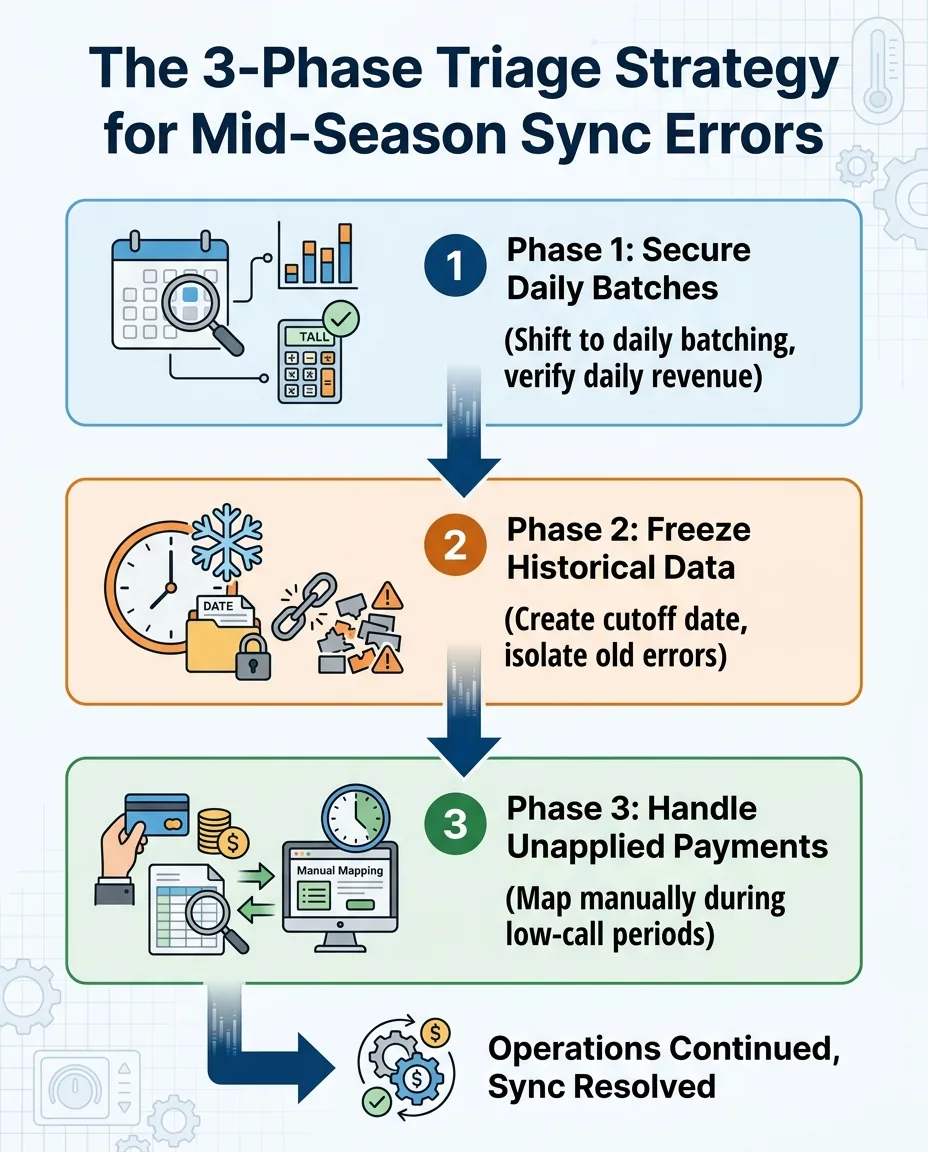
To implement this triage strategy, follow these core steps:
1. Secure today's revenue: Prioritize keeping technicians routed and current-day deposits flowing over fixing past errors immediately.
2. Freeze yesterday's data: Stop the system from automatically trying to fix old, broken batches so it does not clog the current daily sync.
3. Audit tomorrow: Schedule the deep reconciliation work for specific, low-volume windows rather than attempting it during peak dispatch hours.
This phased approach ensures that you stop adding to the mess while maintaining the cash flow necessary to make payroll and purchase equipment.

Phase 1: Securing Daily Batches to Protect Current Revenue
The first and most critical phase of your triage strategy is stopping the bleeding. You cannot begin to fix a broken ServiceTitan to QuickBooks Online integration if you are continuously adding new errors to the pile every single day. You must provide actionable steps to ensure that today's money is being accounted for correctly.
To secure your current revenue, you need to transition your team's workflow immediately. Follow these steps to lock down your daily finances:
1. Shift to daily batching: If you currently batch transactions weekly, stop. Weekly batches during peak season contain too many transactions. If one invoice is mapped incorrectly, the entire weekly batch fails. Batching daily reduces the complexity of identifying sync errors to a much smaller, manageable pool of transactions.
2. Verify current-day deposits: Before closing out the day, pull the daily revenue report in your field service software and compare it directly to the batched deposits pushing into QuickBooks Online. They must match to the penny.
3. Establish a strict end-of-day workflow: Create a mandatory checklist for the office manager that takes less than 15 minutes to complete. This ensures that fatigue does not lead to skipped verification steps.
Establishing the Daily Cutoff
The secret to successful daily batching is consistency. You must establish a firm daily cutoff time—for example, 4:30 PM. Any job completed and paid before 4:30 PM belongs to today's batch. Any job completed after that time rolls into tomorrow's batch.
Communicate this cutoff clearly to all dispatchers and field technicians. When everyone understands the timeline, you prevent late-day invoices from straddling two different financial days, which is a primary cause of integration confusion.
Phase 2: Freezing Historical Data and Isolating Errors
Once you have secured your daily batches and ensured that today's revenue is flowing cleanly through the ServiceTitan to QuickBooks Online integration, you must address the backlog. However, the goal in Phase 2 is not to fix the backlog immediately, but to freeze it. You must handle the backlog of errors without breaking the newly secured daily flow.
If you allow your accounting system to continuously attempt to push old, corrupted batches, it will drain system resources and potentially cause your clean daily batches to fail. To isolate these errors, you need to create a strict cutoff date in your accounting system.
• Set the boundary: Choose a specific date (e.g., July 1st). Everything before this date is considered "historical data." Everything after is your "secured daily flow."
• Move errors to a review status: Within your field service software, identify all failed batches, unexported invoices, and unapplied payments from before the cutoff date and move them into a dedicated review or hold status.
• Disable auto-retries: Prevent the system from automatically attempting to push these old, corrupted batches. They must remain frozen until a human manually reviews and corrects them.
By quarantining the historical errors, you protect your current cash flow. The mess is still there, but it is contained, allowing your team to focus on the active dispatch board without the software constantly timing out.
Phase 3: Handling Unapplied Payments Without Pausing Dispatch
The Problem: One of the most common and frustrating sync errors during peak summer HVAC season is the accumulation of unapplied payments. Your customer paid the technician, the money is in your bank account, but your accounting software shows the invoice as unpaid and the payment as "unapplied."
The Cause: Unapplied payments usually occur when a payment is collected before the final invoice is officially generated and exported. If a technician takes a deposit for a large installation, but the office does not finalize the invoice until the job is completed three days later, the sync pushes the payment over with nothing to attach it to. The integration simply drops the money into an unapplied funds account.
The Solution: You must map these payments correctly in QuickBooks Online without attempting to do it all at once. One business struggled during the summer season to get accurate financial feedback due to a mountain of unapplied payments. By adopting a methodical approach to mapping these payments manually during low-call periods, they finally achieved spot-on numbers without interrupting their dispatch board.
Provide a workflow that allows office staff to chip away at this list. Dedicate just 20 minutes during the slowest part of the morning to manually open QuickBooks Online, locate an unapplied payment, find the corresponding open invoice, and use the "Receive Payment" function to link them together. By treating this as a gradual cleanup project rather than an emergency overhaul, you safely resolve the issue without halting daily operations.
Optimizing Business Systems for Home Service Workflows
When the internal team is too overwhelmed by peak season demands to manage a technical audit, transitioning to specialized help is often the safest operational choice. Generic bookkeeping advice often fails because it simply does not account for the unique operational flow of an HVAC or plumbing business. A standard accountant might tell you to pause your software and rebuild your ledger, completely ignoring the fact that pausing your software means you cannot dispatch technicians to emergency calls.
Specialized teams can untangle integration messes in the background while your front office focuses entirely on customer calls. Contractor in Charge specializes exclusively in home service accounting and admin, bringing deep expertise in mapping ServiceTitan workflows directly to QuickBooks Online without operational hiccups.
Proper mapping ensures that when the busy season finally ends, the financial data is actually ready for high-level review. By prioritizing business systems and software optimizations tailored specifically for the trades, you ensure that your ServiceTitan to QuickBooks Online integration works for you, rather than against you, even on the hottest day of the year.
Frequently Asked Questions About Mid-Season Software Reconciliation
How to fix ServiceTitan sync errors without losing data?
The safest way to fix sync errors without data loss is to isolate the errors rather than deleting them. Move failed batches into a hold status and stop the system from auto-retrying the sync. Once isolated, you can manually review the mapping for each specific transaction—such as checking if a new payment type was routed to the wrong clearing account—and correct the root cause before attempting a manual push.
How do you reconcile QuickBooks while ServiceTitan is active?
You reconcile an active system by establishing a firm daily cutoff time and batching daily. By drawing a line at a specific hour (e.g., 4:00 PM), you create a closed loop of transactions for that day. You can then reconcile that specific daily batch in QuickBooks Online while ServiceTitan continues to process new active jobs for the following day's batch, keeping the two processes completely separate.
What is the best way to handle unapplied payments during peak season?
The best approach is to chip away at unapplied payments during scheduled, low-call volume windows rather than attempting a mass fix. Identify the payments that were pushed before their corresponding invoices were finalized. Then, manually link the payment to the correct open invoice inside your accounting software, ensuring you do not disrupt the active dispatch board while making these corrections.
Why is ServiceTitan not syncing to QuickBooks?
Sync failures usually stem from mapping discrepancies between the two platforms. The most frequent culprits include incorrectly configured clearing accounts, new pricebook items that lack a corresponding income account in your ledger, or massive batch sizes that cause the integration to time out. Verifying your chart of accounts mapping is the first step to restoring the connection.
Can you pause ServiceTitan accounting sync without affecting operations?
Yes, you can pause the outbound accounting sync without impacting your dispatching or field operations. Technicians can still receive calls, build estimates, close out jobs, and collect payments in the field. The data simply remains securely housed within the field service software until you re-enable the sync and allow the batches to push over to your accounting platform.
How often should HVAC companies batch transactions during the summer?
During peak summer months, HVAC companies should batch transactions daily. High transaction volumes make weekly batching too risky; if a weekly batch fails, you are left sifting through hundreds of invoices to find a single error. Daily batching keeps the data sets small, making it much easier to spot discrepancies and ensure daily bank deposits match your software reports.
Achieve Seamless Accounting Without Sacrificing Dispatch Speed
Reconciling ServiceTitan with QuickBooks Online mid-summer without halting operations does not have to mean choosing between accurate accounting and serving your customers. By securing your daily batches, freezing historical errors, and methodically handling unapplied payments, you can stabilize your software integration. A clear, actionable sequence of steps allows you to safely audit and sync your FSM and accounting software without having to shut down operations or delay technician routing during the peak summer HVAC season.
If your internal team is stretched too thin fielding emergency calls to manage a complex software audit, you do not have to tackle it alone. Encourage your team to seek specialized support to protect your cash flow and untangle the backlog safely. Explore professional fractional CFO and bookkeeping services to ensure your financial data remains as reliable as your field service team.