

Migrating from QuickBooks Desktop to Online Mid-Year: Mitigating the Operational Risks

The High Stakes of Switching Accounting Software Without Pausing Operations
Your dispatch board is buried under a backlog of active service calls, and the last thing you want to navigate is a major software change. Yet, moving from QuickBooks Desktop to QuickBooks Online in the middle of the year is a reality many HVAC contractors must face head-on as older software versions face sunset dates. A mid-year fiscal transition feels a lot like trying to change a tire on a moving truck. The dread is entirely justified.
When you transition accounting systems while operations are in full swing, the primary risks are massive. You face the threat of losing historical financial data, stalling your daily cash flow, and missing critical weekly payroll cycles for your field technicians. This is not just a simple IT update where you click a button and wait for a progress bar to finish. A successful migration serves as a critical operational bridge that connects your past financial stability to your future cloud-based efficiency.
To ensure this bridge holds strong, our team frequently steps in with professional bookkeeping and accounting services to guide the process. In our years of helping contractors navigate these transitions, we've found that with the right framework and preparation, this shift can happen smoothly without disrupting your daily business activities.
• Focuses only on software installation and user logins. — Operational Bridge (Mid-Year Migration): Focuses on data integrity, cash flow continuity, and workflow alignment.
• Assumes automated tools will handle data transfer perfectly. — Operational Bridge (Mid-Year Migration): Requires manual data mapping to protect historical job-costing.
• Often performed overnight with minimal testing. — Operational Bridge (Mid-Year Migration): Involves weeks of preparation, sandbox testing, and parallel runs.
• Treats payroll as just another data point to sync. — Operational Bridge (Mid-Year Migration): Treats payroll as the most sensitive, zero-fail component of the switch.
The bottom line: You cannot afford to pause your operations just to accommodate a software change. The transition must bend to the needs of your business, not the other way around.
Why a Mid-Year Transition Amplifies Operational Vulnerabilities
Software obsolescence rarely waits for a convenient time on the calendar. Intuit's ongoing discontinuation of older desktop versions forces a timeline that often does not align with your fiscal year-end. When this forced timeline results in a mid-year fiscal transition, it usually lands squarely in the peak summer HVAC season. With summer temperatures soaring and emergency no-cooling calls flooding your dispatch board, flawless execution is critical to avoid bottlenecks when call volume and revenue are at their absolute highest.
Executing a migration during these high-revenue months amplifies every operational vulnerability. The most immediate danger is the cash flow bottleneck. If your invoicing system goes offline or fails to sync properly for even two or three days, your cash flow pipeline dries up. However, your supplier bills for new equipment and your payroll obligations for technician overtime do not stop.
Rushing this process without a structured plan leads directly to fragmented data and operational chaos. To prevent these vulnerabilities from crippling your growth, partnering with our fractional CFO and accounting services provides the strategic oversight we know is needed to navigate the switch safely.
• Forced timelines: Compliance issues and software sunsets dictate the schedule, ignoring your busy season.
• Cash flow interruption: Unmapped invoice data delays customer billing and slows incoming revenue.
• Fragmented reporting: Rushed automated imports leave behind the granular details you need to track profitability.
• Technician frustration: Any disruption in payroll or dispatch syncing immediately impacts field morale.
We consistently remind our clients that operational continuity must always dictate the migration timeline. If the software is ready but your data mapping is not, you do not flip the switch.
Identifying the Data Gaps: What Doesn't Automatically Transfer
Moving from QuickBooks Desktop to QuickBooks Online is not a simple one-to-one copy of your hard drive. The structural differences between a locally hosted relational database and a cloud-based accounting environment are significant. Because of these architectural differences, certain types of transaction data and summary data require manual intervention or highly specific mapping protocols.
If you rely solely on the default automated import tools, you will encounter immediate data gaps. Custom reports you have relied on for years will not transfer. Specific inventory tracking details often get jumbled or dropped entirely. Certain payroll histories and custom data fields used for tracking technician performance will fail to sync, leaving you with a blank slate where you need historical context.
For instance, when our team worked with a home service business owner planning for a high-end transition last winter, they realized that maximizing their valuation required their financial house to be in perfect order. Serving as their fractional CFO, we ensured that meticulously organized financials yielded the highest end of their valuation range. That level of meticulous financial organization is impossible if a sloppy software migration scrambles your historical data and leaves unmapped gaps in your reporting.
The Threat to Historical Job-Costing
HVAC businesses rely heavily on historical job-costing to price future jobs accurately. You need to know exactly what a specific compressor replacement cost in labor and materials last season to bid a similar job profitably today. Default automated migrations often summarize this data, rolling it into broad categories and stripping out the vital line-item details.
Protecting this granular data requires proactive extraction and specialized re-entry protocols. If unmapped data is allowed to skew your financial reporting, your valuation metrics and profit margin calculations will be fundamentally flawed moving forward.
Executing a Rigorous Data-Mapping Protocol
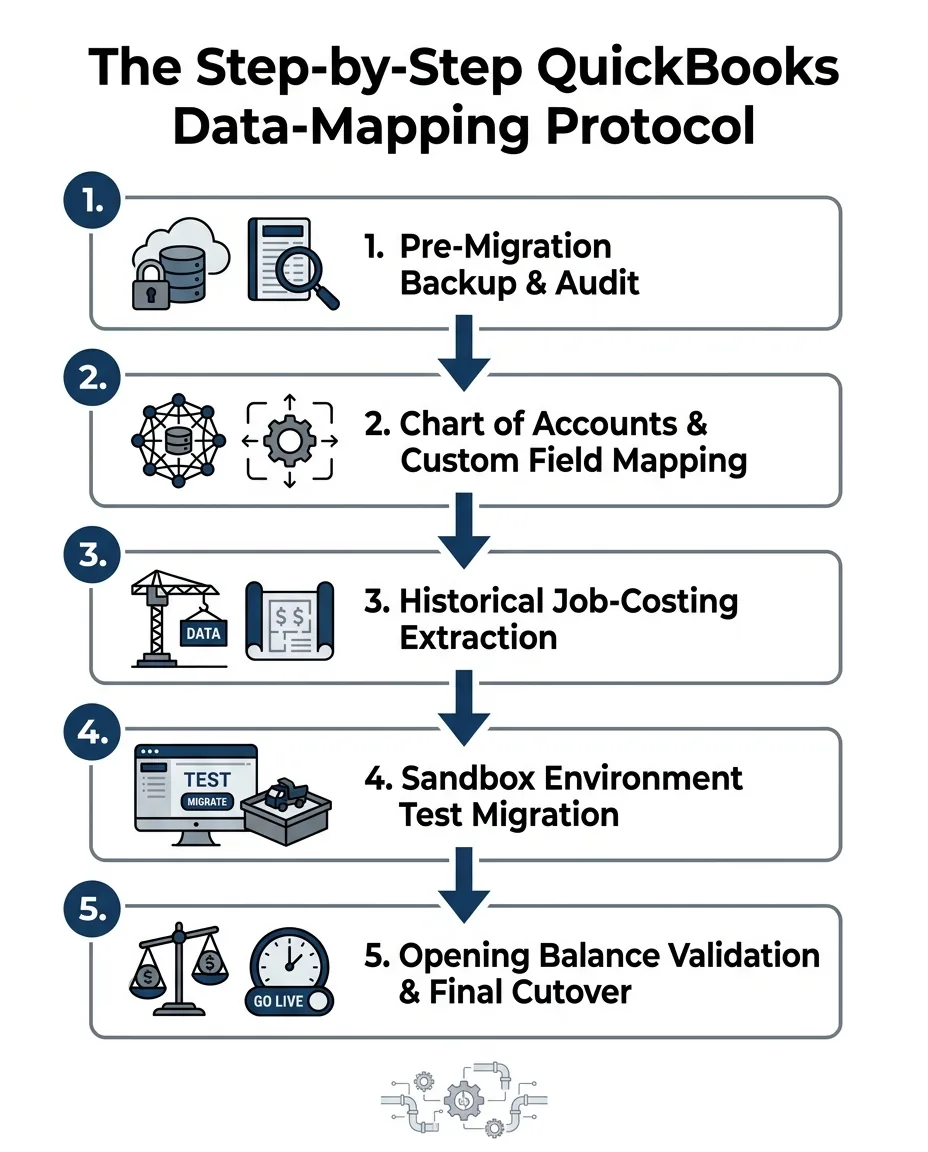
To avoid the pitfalls of a default automated transfer, you must follow a rigorous, step-by-step framework. At Contractor in Charge, our team utilizes a specific data-mapping protocol we designed exclusively to transition HVAC and home service accounting software seamlessly, ensuring no critical details are lost in the cloud. Here is the framework we implement for our clients:
1. Conduct a pre-migration backup and comprehensive data audit: Before any data moves, create a secure, verified backup of your desktop file. Audit your current files to identify unused accounts, duplicate vendors, and outdated customer records that should be purged before the move.
2. Map chart of accounts and custom fields: Home service businesses have unique operational needs. Your chart of accounts must be mapped specifically to reflect field labor, equipment costs, and warranty reserves. Custom fields used in your dispatch software must have a corresponding destination in the new cloud environment.
3. Export and format historical job-costing data: Because automated tools often summarize job costs, you must manually export this data into structured formats. This ensures the granular details are securely transferred and properly associated with the correct customer accounts.
4. Execute a test migration in a sandbox environment: Never push data directly into your live production environment on the first try. Run a test migration in a secure sandbox to identify mapping errors, broken links, and missing fields. This is where you catch the mistakes before they impact your business.
5. Validate opening balances and reconcile accounts: Once the final cutover is complete, immediately validate your opening balances. Reconcile your bank accounts, accounts receivable, and accounts payable to ensure the new system matches the old system perfectly down to the penny.
In our experience, implementing these steps is one of the most critical systems you need to scale a service business effectively without losing your historical foundation.

Protecting Field Technician Payroll Continuity
Of all the data moving from QuickBooks Desktop to QuickBooks Online, payroll is the most sensitive component. A mid-year fiscal transition means you are moving employee records, year-to-date (YTD) earnings, and tax liabilities right in the middle of the reporting calendar. If these numbers are off by even a fraction, you risk severe tax penalties and, more importantly, a breakdown in trust with your field technicians.
Our protocol is built to avoid payroll downtime, keeping your technicians focused on the field rather than worrying about their paychecks. The strategy we use for migrating this data securely involves careful timing and rigorous verification. You must extract detailed employee records, including current deductions, garnishments, and accrued time off, and map them flawlessly into the new cloud payroll module.
The parallel payroll strategy we recommend:
• Establish the baseline: Run your standard payroll in the desktop system as usual.
• Run the shadow payroll: Enter the exact same hours, commissions, and deductions into the new cloud system.
• Compare the variance: Verify that the net pay, tax withholdings, and employer liabilities match perfectly between both systems.
• Resolve discrepancies: Adjust tax mapping or deduction settings in the cloud system until the variance is zero.
A zero-downtime transition requires aligning the migration date with your natural payroll cycle gap. By scheduling the cutover immediately after a payroll run is finalized, you buy yourself the maximum number of days to verify the data before the next batch of checks must be cut. Proper business systems and software optimization ensures this timing is executed flawlessly.
The Operational Bridge: Running Parallel Systems
The safest way to transition accounting platforms is to build an operational bridge by maintaining both systems temporarily. This phase, known as the "parallel run," ensures stability and provides accurate financial feedback while your team adapts to the new cloud environment.
During a recent busy summer season, our team helped a home services business stabilize their dispatch and accounting operations mid-transition. By managing both the call taking and the accounting functions for them, we provided accurate numbers, reachable support, and highly actionable feedback. We've seen firsthand that this level of precise organization is exactly what a parallel run requires to be successful.
Running parallel systems provides a critical safety net. If the new cloud environment experiences configuration issues, integration failures with your dispatch software, or user-error bottlenecks, your desktop system is still fully functional and recording accurate data. You are never left flying blind.
During this phase, you must verify daily dispatch and invoicing data against both systems. Every closed work order, processed payment, and vendor invoice must be entered and reconciled in both places. While this requires double entry temporarily, it is the only way to prove the new system is calculating revenue and expenses correctly.
We help our clients establish strict criteria for officially sunsetting the old system. Once the cloud system has successfully processed a full month-end close, a complete payroll cycle, and a flawless bank reconciliation without any unexplained variances, the operational bridge has served its purpose. Only then do you archive the desktop software and move forward entirely in the cloud.
Frequently Asked Questions About Mid-Year Accounting Migrations
Can I migrate from QuickBooks Desktop to Online mid-year?
Yes, a mid-year transition is entirely possible and often necessary due to software updates or compliance deadlines. It requires careful planning to ensure year-to-date payroll and tax liabilities transfer accurately without disrupting your daily cash flow. By utilizing a structured data-mapping protocol, you can bridge the gap safely regardless of what month it is.
What data does not migrate to QuickBooks Online?
Certain custom reports, specific inventory tracking details, and some granular payroll histories do not transfer automatically during a default migration. Because the database structures differ, automated tools often summarize data rather than moving it line-by-line. These specific elements require manual data-mapping to preserve your historical integrity.
How long does it take to migrate from QuickBooks Desktop to Online?
The technical data upload itself can take just a few hours, but the preparation, mapping, and validation process should span several weeks. Rushing the timeline significantly increases the risk of operational disruption and data corruption. A safe migration involves extensive sandbox testing and a parallel run phase to ensure stability.
Do I lose my historical data when switching to QuickBooks Online?
You do not have to lose historical data if a proper data-mapping protocol is followed prior to the switch. Without specialized mapping, the default automated tools may transfer only summary data while granular job-costing details are lost forever. Proactive extraction and formatting ensure your historical pricing data remains intact.
How do I ensure payroll continuity when migrating accounting software?
Schedule the final data cutover immediately following a completed payroll run to maximize your verification window. Run a parallel test payroll in the new system to verify YTD totals, deductions, and tax calculations against your old system. You only go live with the new payroll module once the test run produces a zero-variance result.
Navigate Your Software Transition with Confidence
A mid-year fiscal transition does not have to mean risking your field technicians' payroll or losing the historical job-costing data you rely on to price your services profitably. By treating the migration as a critical operational bridge rather than a simple software update, you protect your cash flow and your data integrity.
You do not have to navigate this complex transition alone. By partnering with our team at Contractor in Charge, you ensure that a clear, rigorous data-mapping protocol and step-by-step migration framework are applied to your specific business needs. With our expert guidance, you can secure your financial history and achieve a flawless transition to the cloud without ever pausing your daily operations.