

In-Depth Guide to QuickBooks for Home Service Businesses


Why Understanding QuickBooks for Home Service Businesses Can Make or Break Your Bottom Line
How does QuickBooks work for home service businesses? Here is the short answer:
QuickBooks works for home service businesses by:
1. Tracking income and expenses - Every invoice, payment, and expense is recorded in one place, giving you a real-time picture of your cash flow.
2. Organizing job costs - You can assign labor, materials, and subcontractor costs to specific jobs so you know exactly which work is profitable.
3. Automating invoicing - Create estimates in the field, convert them to invoices, and collect payment digitally without chasing paper.
4. Managing payroll and 1099s - Pay W-2 employees and track subcontractor payments so you are ready at tax time with no surprises.
5. Syncing with field service tools - Connect scheduling, dispatch, and CRM software so your office books are always in step with what your team does in the field.
6. Preparing you for taxes - Categorize deductions, calculate sales tax, and generate the financial reports your accountant needs.
If you run a plumbing, electrical, HVAC, or other home service business, you already know the job site is only half the battle. The other half is knowing whether the work you just completed actually made you money. Yet a staggering 82% of small businesses fail because of poor cash flow management — not because they lacked skilled technicians or quality customers. The back office catches up with everyone eventually.
Most trade contractors start with a rough idea of their finances: they check the bank balance, hope the numbers look okay, and move on to the next call. That approach works until it does not — and by then, the damage is already done. QuickBooks gives home service businesses the structure to stop guessing and start making decisions based on real numbers.
I'm Anna Lynn Wise, CEO of Contractor In Charge and a former owner and general manager of a plumbing, HVAC, and remodeling company. With a background in finance and an MBA, I have spent decades helping trade contractors understand how QuickBooks works for home service businesses and how to use it as a genuine management tool, not just a tax-season checkbox. This guide walks you through everything you need to know to set it up right and use it well.
How Does QuickBooks Work for Home Service Businesses?
At its core, QuickBooks acts as the central repository for every single financial transaction that occurs in your business. When configured correctly, it translates the chaotic daily activities of your service vans, dispatchers, and technicians into structured financial data.
For home service businesses, the magic of QuickBooks lies in its ability to move beyond basic bookkeeping. It allows us to view our business from two critical angles: macro-level health (your overall Balance Sheet and Profit & Loss statement) and micro-level performance (how much profit you made on that sewer line replacement on 4th Street).
To understand how to get the most out of this system, we must first look at the platform options available.
• Accessibility — QuickBooks Online (QBO): Cloud-based; access from any device, anywhere — QuickBooks Desktop (QBD): Installed locally on a computer or hosted on a server
• Real-Time Sync — QuickBooks Online (QBO): Instant automatic updates via cloud — QuickBooks Desktop (QBD): Manual sync or scheduled backups required
• Mobile App — QuickBooks Online (QBO): Fully featured for field technicians — QuickBooks Desktop (QBD): Limited mobile capabilities
• Integrations — QuickBooks Online (QBO): Seamless API connections with modern FSM tools — QuickBooks Desktop (QBD): Requires complex middleware or hosting setups
• Upkeep & Maintenance — QuickBooks Online (QBO): Automated updates included in subscription — QuickBooks Desktop (QBD): Manual software updates and annual upgrades
As of June 2026, the accounting landscape has shifted heavily toward cloud-based operations. Intuit has phased out connected services for older desktop versions, making QuickBooks Desktop to Online Conversions a top priority for trade contractors who want to keep their operations modern, secure, and fully integrated with modern field tools.
Choosing the Right QuickBooks Online Plan for Your Trade
One of the most common pitfalls we see occurs before a contractor even enters their first transaction: they sign up for the wrong subscription tier. QuickBooks Online offers several plans, but they are not created equal when it comes to the unique demands of the trades.
• Simple Start: This plan is designed for true solo operators who do not track jobs. If you are a single-person LLC doing basic service calls and do not care about tracking individual job profitability, this can get you started. However, you will quickly outgrow its lack of project tracking.
• Essentials: While Essentials offers multi-user access and bill management, we strongly advise trade contractors to skip this tier. It completely lacks the job costing and project tracking capabilities that are vital to knowing if your service calls are actually making money.
• Plus: This is the absolute floor for any serious home service or trade contractor business. The Plus plan unlocks the "Projects" feature, which is the engine behind accurate job costing. It allows us to assign labor, materials, and subcontractor costs directly to specific projects to run real-time profitability reports.
• Advanced: This tier is built for rapidly growing service businesses that have outgrown Plus. It is ideal if you need more than five users, require custom user permissions, or want to build advanced automated workflows (such as automated invoice approvals or customized financial dashboards).
For 90% of growing plumbing, electrical, and HVAC companies, QuickBooks Online Plus is the sweet spot. It provides all the power needed to track job-level margins without paying for enterprise-level features you may not use yet.
QuickBooks Online vs. QuickBooks Desktop in 2026
For years, many established contractors clung to QuickBooks Desktop because of its robust local reporting and deep inventory features. However, in June 2026, the argument for Desktop has largely evaporated.
QuickBooks Online provides unmatched cloud access. Your office dispatchers in Tampa, your technicians in the field, and your remote bookkeeping team can all work within the same live file simultaneously. There is no more emailing backup files to your CPA or worrying about a hard drive crash wiping out years of financial history.
Furthermore, modern Field Service Management (FSM) tools are built cloud-first. They integrate natively and cleanly with QuickBooks Online, pushing invoices, payments, and customer details back and forth in real time. Running a modern service business on Desktop in 2026 often means dealing with clunky, delayed sync processes that slow down your billing cycle and cloud your visibility.
Setting Up QuickBooks for Maximum Job Profitability
A common mistake contractors make is setting up QuickBooks using a generic template. If your Chart of Accounts looks exactly like the one used by the local retail boutique or graphic designer down the street, your financial reports will be virtually useless for making business decisions.
To track true job profitability, we must structure the system to match the actual flow of a home service business. This starts with understanding how we account for our work. Before diving into the setup, it is highly beneficial to understand the differences between Accrual vs Cash Accounting for Contractors Explained so you can choose the method that gives the most accurate picture of your business's financial health.
Structuring Your Chart of Accounts for Home Services
Your Chart of Accounts (COA) is the backbone of your entire financial system. For a home service business, we want to clearly separate our operational revenue, our direct job costs, and our general overhead.
• Income Accounts: Do not lump all your earnings into a single "Service Income" bucket. Instead, segment your revenue by service lines. For example, an electrical contractor should have separate income accounts for Residential Service, Commercial Service, New Construction, and EV Charger Installations. This instantly shows you which areas of your business are driving the most revenue.
• Cost of Goods Sold (COGS): This is where we track our direct job costs. COGS should be divided into clear categories:
— Direct Labor: The wages paid to your technicians for time spent on job sites. To take your reporting to the next level, set up tiered labor COGS accounts based on licensing levels (e.g., Apprentice, Journeyman, Master).
— Materials: The cost of parts, equipment (like HVAC condensers or water heaters), and supply house runs.
— Subcontractor Labor: Payments made to external trade partners.
— Direct Job Expenses: Permit fees, equipment rentals, or job-specific fuel.
• Operating Expenses (Overhead/G&A): These are the costs of running your business that cannot be tied to a specific job. This includes office rent, dispatcher salaries, general liability insurance, software subscriptions, and marketing.
By separating direct job costs (COGS) from overhead, you can calculate your true gross margin. If your gross margin is healthy but your bank account is empty, you know you have an overhead problem, not a pricing or job performance problem.
Managing Sales Tax and Sole Proprietor Setup
Sales tax compliance can be a major headache for home service businesses. Rules vary wildly depending on your location and the type of work you perform. For instance, in our active service areas like Florida and Texas, the taxability of labor can differ significantly between residential repairs, commercial maintenance, and new construction.
QuickBooks Online handles this by utilizing an automated sales tax engine. When you set up your tax settings, you enter your business address and register your local tax agencies. When invoices are generated, QuickBooks calculates the correct tax based on the customer's address and the specific product or service item mapped on the invoice. It is critical to map your service items correctly to ensure you are not under-collecting or over-paying sales tax.
For sole proprietors or single-member LLCs just starting out, the absolute golden rule of QuickBooks setup is the complete separation of personal and business finances.
If you are a one-person plumbing or HVAC shop, do not run personal groceries or family dinners through your business bank account. Open a dedicated business checking account and credit card, link them directly to QuickBooks, and pay yourself via structured owner's draws. Mixing personal and business expenses not only distorts your business profitability metrics, but it also compromises your liability protection and creates a nightmare for your tax preparer.
Integrating Field Service Management (FSM) with QuickBooks
Unless you are a very small, one-person operation running a handful of service calls a week, you should not be invoicing directly out of QuickBooks. Instead, you should use a Field Service Management (FSM) or CRM tool to handle scheduling, dispatching, and field invoicing, and let that tool sync seamlessly with QuickBooks.
This is where understanding Accounting and FSM Integration Best Practices for Contractors becomes essential for keeping your office and field operations in perfect harmony.
How Does QuickBooks Work for Home Service Businesses with FSM Sync?
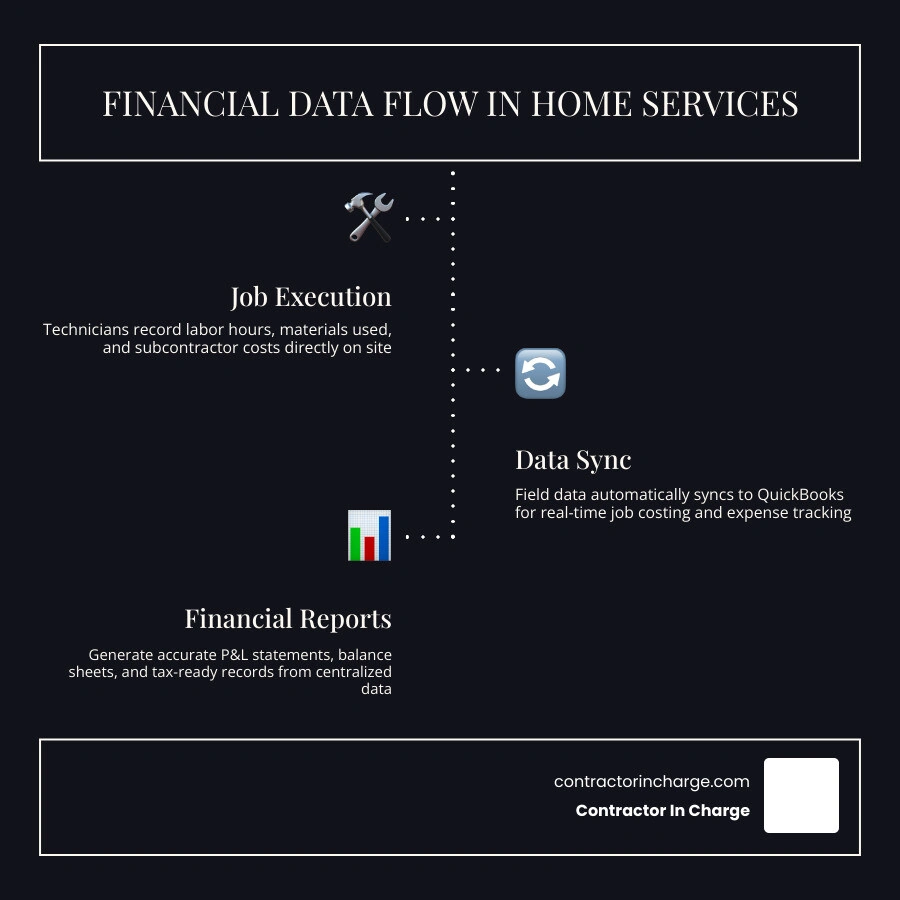
When you integrate an FSM tool like Jobber, Housecall Pro, or ServiceTitan with QuickBooks Online, you create an automated financial pipeline.
When a customer calls to request service, your dispatcher books the job in the FSM tool. The technician receives the dispatch on their mobile app, performs the work, takes photos, and generates an estimate or invoice right at the kitchen table. Once the customer signs off and pays via credit card or check, that invoice and payment data automatically syncs back to QuickBooks.
This integration delivers several massive benefits:
• Eliminates Double Entry: Your office staff no longer has to manually re-type paper invoices from the field into your accounting software.
• Speeds Up Cash Flow: Invoices are generated and sent immediately upon job completion, allowing you to get paid faster.
• Improves Data Accuracy: Customer contact details, service histories, and payment records match perfectly across both systems.
Evaluating Integration Depth and Avoiding Sync Errors
Not all software integrations are created equal. When evaluating field tools, you must look past the marketing claim of "Integrates with QuickBooks" and look at the actual depth of the sync.
• Tier 1: CSV Import/Export: The most basic level. You manually export a spreadsheet from your FSM and import it into QuickBooks. This is time-consuming and prone to human error.
• Tier 2: One-Way Sync: The FSM tool pushes invoices and payments to QuickBooks, but changes made in QuickBooks do not sync back to the FSM.
• Tier 3: Two-Way Sync: Customer records, invoices, and payments sync back and forth dynamically. If a customer updates their phone number in the field, it updates in your books automatically.
• Tier 4: Deep, Configurable Sync: Advanced tools allow you to map specific FSM business units or service types directly to QuickBooks classes and projects, giving you highly detailed reporting.
The most common integration headache for contractors is the creation of duplicate customer records. If a technician enters "John Smith" in the field, but your books already have "Smith, John," the sync may create a duplicate account.
To prevent this, assign one person in your office to monitor the integration sync logs weekly, resolve any sync errors immediately, and keep your customer database clean.
Bookkeeping Best Practices and Avoiding Costly Mistakes
Even the best software setup will fail if it is not supported by disciplined habits. Far too many contractors treat bookkeeping as a chore to be completed once a year in April. By then, the data is cold, opportunities to improve profitability are lost, and you are likely making decisions based on inaccurate information.
To keep your business on track, we recommend reviewing our QuickBooks Mistakes Contractors Guide 2026 to identify and correct common errors before they impact your bottom line.
Daily Tracking, Reconciliation, and Invoicing Workflows
To maintain financial control, we advocate for a structured, frequency-based bookkeeping workflow.
Every single day, someone should log into QuickBooks to categorize transactions coming through the live bank feeds. This keeps your records fresh and ensures you catch unauthorized charges or banking errors immediately.
At least weekly, you should review your Accounts Receivable (AR) aging reports to identify past-due invoices and follow up on late payments. Home service businesses that send digital invoices and accept online payments get paid 40% faster than those relying on paper billing, but you still need a proactive follow-up process.
On a monthly basis, you must perform bank reconciliations. This is the process of matching your QuickBooks records against your actual bank and credit card statements to ensure every single penny is accounted for. Businesses that reconcile monthly reduce financial discrepancies by a massive 65%.
To build these habits, review our guide on How to Keep Clean Financial Records as a Contractor.
Managing Payroll and 1099 Contractors
Labor is typically the largest expense for any home service business. Managing this cost accurately in QuickBooks is vital for both tax compliance and understanding your true labor burden.
For your W-2 employees, QuickBooks Payroll can automate tax withholdings, direct deposits, and quarterly payroll tax filings. However, you must ensure that technician hours are mapped directly to your COGS labor accounts rather than lumped into general office payroll. This allows you to track how much you are spending on field labor relative to the revenue those technicians are generating.
For 1099 independent contractors, you must collect a Form W-9 before they ever step foot on a job site. In QuickBooks, set up these contractors as vendors and check the box for "Track payments for 1099." Come January, QuickBooks can automatically generate and e-file Form 1099-NEC for any contractor paid over the annual threshold.
For a complete breakdown of these fundamental concepts, take a look at the Bookkeeping Basics Every Contractor Should Understand.
How Does QuickBooks Work for Home Service Businesses to Prevent Mistakes?
Many contractors make the mistake of batching their expenses. For example, they might receive a monthly statement from their primary plumbing supply house and enter it as a single, lump-sum expense in QuickBooks.
While this saves a few minutes of data entry, it completely destroys your job costing. Batching expenses can make your job profitability reports inaccurate by 15% to 25% because those material costs are not being allocated to the specific projects where they were used. Every invoice from a supply house should be broken down and coded to the correct job or project.
Additionally, we highly recommend utilizing the "Class Tracking" feature in QuickBooks Online Plus or Advanced. Classes allow you to track performance by department or service line rather than just individual jobs.
For example, you can set up classes for Residential Service, Commercial Service, and New Construction. At the end of the month, you can run a Profit & Loss statement by Class to see exactly which division is carrying the business and which might be dragging down your overall profitability. Without this visibility, poor bookkeeping can easily mask your real business performance, as explained in How Poor Bookkeeping Hides Your Real Business Performance.
Frequently Asked Questions about QuickBooks for Home Services
When should a home service business hire a professional bookkeeper?
As a general rule of thumb, if you are spending more than 5 hours a week managing your books, or if you find yourself falling more than a month behind on reconciliations, it is time to bring in professional help.
Furthermore, if you struggle to read a Profit & Loss statement or feel anxious about tax compliance, partnering with a professional bookkeeper can provide immense relief. Businesses that work with professional bookkeepers see an average of 18% higher profit margins because they have the clean, accurate data needed to price their services correctly and cut unnecessary waste.
Can QuickBooks handle inventory for service trucks?
QuickBooks Online Plus and Advanced can track basic inventory quantities and values. However, for home service businesses with multiple service vans carrying thousands of dollars in "truck stock," managing inventory solely within QuickBooks can be incredibly difficult.
The best practice is to manage your truck stock and parts inventory within your FSM tool (which is designed for mobile parts tracking and purchase orders) and let the financial adjustments sync to QuickBooks. We recommend performing physical inventory counts of your vans monthly and adjusting your QuickBooks records accordingly to capture any unlogged parts or shrinkage.
How does digital invoicing speed up payments for contractors?
When you send a digital invoice with an integrated "Pay Now" button, you eliminate all the friction of the traditional billing cycle. Instead of waiting for a paper invoice to arrive in the mail, writing a physical check, and waiting for you to deposit it, the customer can pay instantly via credit card or ACH right from their phone.
This simple shift can cut your collection time by 5 to 10 days, dramatically improving your cash flow and giving you the working capital needed to fund payroll, purchase materials, and grow your business.
Conclusion
At the end of the day, QuickBooks is not just a tool for keeping the IRS happy. When set up and maintained correctly, it is the ultimate management dashboard for your home service business. It tells you which jobs are profitable, which service lines are growing, and where your hard-earned cash is actually going.
But we also know that you did not start a plumbing, HVAC, or electrical business because you loved data entry and bank reconciliations. Your time is best spent in the field, booking jobs, training technicians, and serving your customers.
That is where we come in. At Contractor In Charge, we offer specialized outsourced bookkeeping, call answering, booking, and dispatch services designed specifically for home service contractors. Our dedicated, US-based team combines industry-specific expertise with old-fashioned customer care to keep your phones ringing, your schedule full, and your books perfectly clean.
Ready to take control of your finances and get the peace of mind you deserve? Explore our QuickBooks Online Services today, and let us handle the back office so you can focus on building your business.