

Identifying Workflow Friction in Your FSM Software During the Late Summer Rush

When Peak Season Demand Exposes Hidden Software Bottlenecks
At Contractor in Charge, we see how late summer heat is already pushing your schedule to the breaking point, making it an absolute operational necessity to spot where your FSM software slows your team down. Right now, your technicians are facing peak August demand, bouncing from one emergency no-AC call to the next with barely a moment to breathe. Every minute counts when the dispatch board is lit up with urgent requests. However, our team often finds that hidden bottlenecks inside your mobile application are actively working against your team's efficiency.
Technicians are losing critical minutes per service call due to sync delays, clunky mobile invoicing, and excessive screen loading times. As an operations manager, you need to pinpoint exactly which mobile features are slowing your team down. The goal is to streamline those specific workflows and maximize daily call capacity, all without attempting the disastrous move of overhauling your entire platform mid-season. Fixing these small technical hurdles now keeps your team moving and your customers satisfied.
If you need immediate help managing the seasonal overflow while you sort out your internal processes, exploring professional contractor support services can provide the breathing room your business needs.
The Disconnect Between the Dispatch Board and the Field
The problem: In our years of supporting home service businesses, we've noticed that Field Service Management (FSM) software often looks highly efficient on a desktop computer in an air-conditioned office, but feels entirely different in the field. Dispatchers see instant updates, easy-to-read schedules, and seamless customer histories. Because the office runs on high-speed broadband and large monitors, the software performs flawlessly. This creates a dangerous blind spot for operations managers who assume the mobile app works just as smoothly.
The cause: The reality of operating a mobile app on a standard smartphone in a hot service van is drastically different. Technicians deal with glare, small touch targets, and spotty cellular coverage. When a dispatcher sees a delayed status update on the board, they might interpret it as technician slowness or inefficiency. In reality, the technician is likely sitting in their van, staring at a spinning loading wheel, experiencing minutes lost per service call due to sync delays.
The solution: You must audit the software from the technician's perspective. Bridging this gap requires targeted business systems and software optimizations that focus entirely on the mobile user experience, ensuring the app works for the technician rather than against them.
Desktop Processing vs. Mobile Processing
Understanding the hardware limitations of standard mobile devices used in the field is the first step to diagnosing software friction. Desktop computers have the processing power to load massive customer histories and complex pricebooks instantly. Smartphones often struggle to render that same data, especially when the device is overheating on a dashboard. Furthermore, differences in user interface design require excessive scrolling or tapping on mobile, turning a simple three-click desktop task into a frustrating twelve-tap mobile chore.
• Network Speed — Office Dispatcher (Desktop): Stable, high-speed fiber or broadband — Field Technician (Mobile): Fluctuating 4G/5G, frequent dead zones
• Screen Real Estate — Office Dispatcher (Desktop): Dual monitors, full keyboard and mouse — Field Technician (Mobile): 6-inch touchscreen, glare, thick protective case
• Processing Power — Office Dispatcher (Desktop): High RAM, instant data rendering — Field Technician (Mobile): Limited memory, prone to thermal throttling
• Task Complexity — Office Dispatcher (Desktop): Multiple tabs open simultaneously — Field Technician (Mobile): Linear, one-screen-at-a-time navigation
Cellular Connectivity and Cloud-Syncing Delays
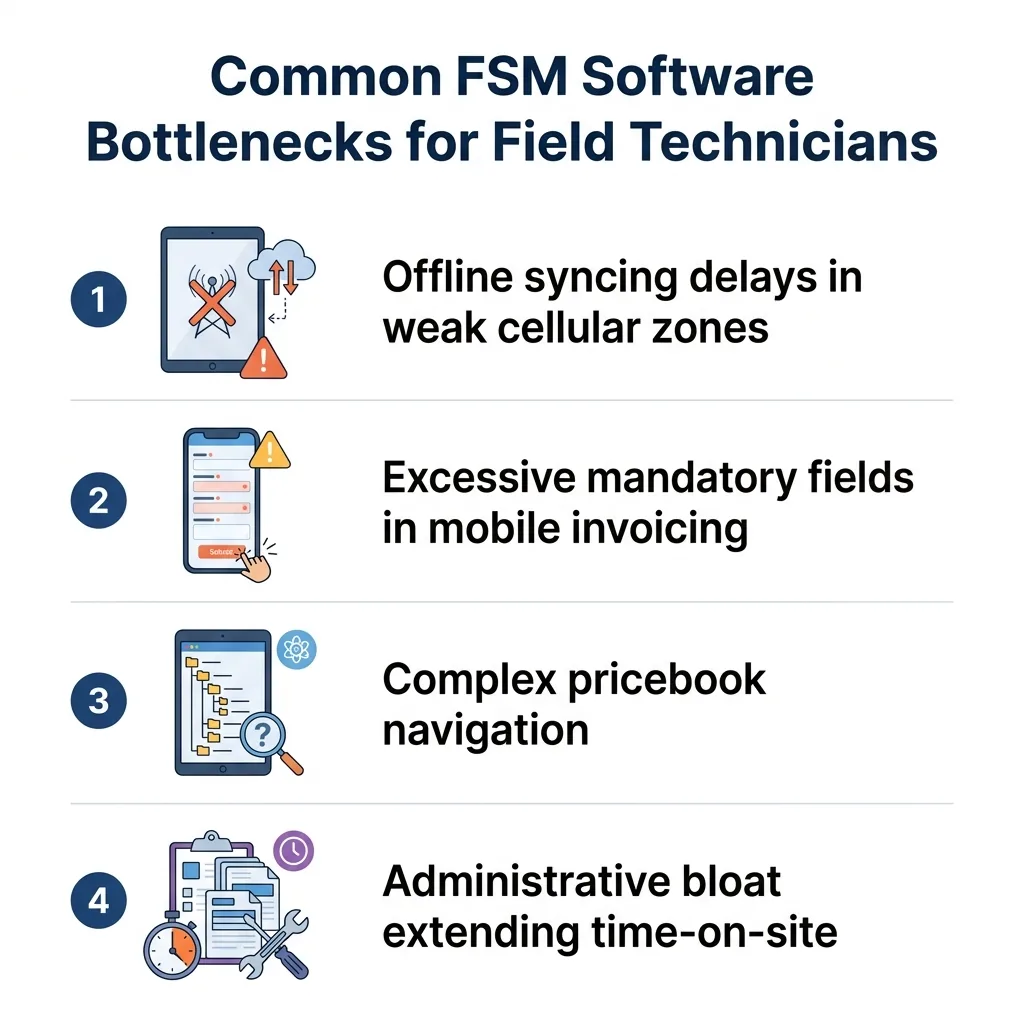
The hidden data trap: Our team has found that one of the most severe technical bottlenecks during peak August demand is the way your software handles cellular connectivity drops. Weak cellular connections in certain residential zones or newly built subdivisions act as a primary cause of software lag. When a technician finishes a repair and taps "complete," the app attempts to push that data to the cloud. If the signal is weak, the app hangs.
The operational impact: This creates a massive disruption in the workflow. Technicians are forced to wait for screens to load before they can close out a job, generate an invoice, or receive their next routing assignment. These offline syncing issues pile up quickly. When you calculate the minutes lost per service call due to sync delays across a fleet of ten technicians running six calls a day, you are losing hours of billable capacity every single week.
Improper offline configurations: Many FSM platforms feature an offline mode, but it is rarely configured correctly out of the box. If the software is set to strictly require an active connection before moving to the next screen, the technician is trapped. They cannot drive away because they need the customer to sign the digital invoice, but the invoice will not generate without a signal.
Actionable adjustments: We highly recommend configuring your software to batch-sync data when strong signals return. By enabling a true asynchronous offline mode, the technician can capture signatures, close the ticket, and drive toward the next neighborhood. The app will quietly upload the data in the background once the van hits a strong cell tower, eliminating the need to idle in a driveway waiting for a progress bar.
Clunky Mobile Invoicing and Administrative Bloat
Generating an invoice in the field should be a seamless, one-minute process. Instead, administrative bloat often forces technicians to spend extra time looking at screens instead of moving to the next call. Sitting in a hot service van during late summer heatwaves makes navigating complex mobile invoices physically exhausting and highly frustrating.
• Excessive mandatory fields: Break down the exact steps required to generate an invoice. If your system forces technicians to fill out mandatory fields for marketing attribution, equipment serial numbers (on non-equipment calls), and multiple signature boxes just to collect a diagnostic fee, you are creating unnecessary friction.
• Overwhelming pricebook navigation: Overly complex pricebook navigation slows down the quoting process. If a technician has to scroll through fifty categories of commercial plumbing fixtures just to find a standard residential capacitor, the system is failing them.
• Redundant data entry: Technicians should never have to type in the customer's name, address, or basic system information if the office already collected it. Every manual keystroke on a mobile device introduces the risk of typos and wastes valuable time.
• Cluttered visual layouts: Mobile screens have limited space. When invoices display heavy blocks of terms and conditions before the final total, the customer gets confused, and the technician has to spend time explaining the layout rather than collecting payment.
Simplifying the Mobile Pricebook
To speed up the closeout process, you must simplify the mobile pricebook. Start by removing redundant categories for field views. Hide commercial or obscure construction codes from the residential service technician's profile. Next, set up quick-add options for common seasonal repairs. During peak August demand, your techs should have a "Summer Favorites" folder right at the top of their screen, containing capacitors, contactors, drain line flushes, and refrigerant top-offs.

How Software Friction Amplifies Technician Fatigue
The compounding toll: Technical software issues directly impact human performance, especially during the peak August heat. When the climate is unforgiving, removing software friction is critical to keeping techs safe, efficient, and alert. A pattern we see often is the compounding effect of losing a few minutes on every single call over a 10-hour shift. If a technician loses eight minutes per stop wrestling with a frozen app, that equates to nearly an hour of lost time by the end of the day. That is an entire service call erased from your capacity.
Mental exhaustion: Software frustration increases mental fatigue, which is already elevated during peak seasonal demand. Technicians are trained to fix complex mechanical systems; they are not IT troubleshooters. Forcing them to restart their tablets, force-close apps, and apologize to customers for slow digital invoices drains their patience. This administrative frustration correlates directly with a decrease in customer service quality at the end of the day. A tired, frustrated technician is less likely to offer maintenance agreements or communicate warmly with the homeowner.
Retention and morale: Position software optimization as a vital tool for improving technician retention. High-performing technicians want to turn wrenches, help customers, and earn their pay. When you eliminate the minutes lost per service call due to sync delays, you show your team that you value their time and physical well-being. A smooth, frictionless app experience keeps morale high even when the schedule is packed.
Alleviating Field Friction Through Better Dispatch Support
The problem: Software limitations cannot always be fixed overnight, and field technicians often bear the brunt of administrative gaps when the office is overwhelmed. When call volume spikes, dispatchers may send vague job notes or leave customer profiles incomplete, forcing the technician to do the data-gathering work on-site.
The cause: Internal teams get stretched thin during the summer rush. Dispatchers are trying to route calls, answer ringing phones, and manage parts orders simultaneously. This chaotic environment means proactive dispatching falls by the wayside. The burden shifts to the field, increasing the administrative load on the technician's mobile app.
The solution: Proactive dispatching can drastically reduce this administrative burden. The office must pre-fill customer data, gate codes, and detailed job notes before the technician arrives. An efficient, organized dispatch team can manage call re-routing smoothly without overwhelming the technician with constant app notifications. At Contractor in Charge, we frequently see cases where operations are transformed by augmenting internal teams. During ongoing summer operations, we partnered with one plumbing and HVAC company that found themselves struggling with the need for efficient call handling, dispatching, and organized accounting while their techs were swamped. By bringing in our dedicated team to handle calls, dispatching, and backend accounting services, they managed their call volume effectively. The result was highly organized dispatching and accurate, reachable accounting, which immediately relieved the administrative pressure on their field technicians. If your internal team is overwhelmed, utilizing a contractor answering service can maintain high efficiency and keep your technicians focused on the repair.
Actionable Steps to Optimize Your Current FSM Platform
You do not need to abandon your software to fix these bottlenecks. Here are concrete steps our team recommends to streamline workflows without the massive disruption of changing platforms mid-season:
1. Audit the mobile workflow in the field: Do not just look at desktop reports. Ride along with a technician or carefully review time-on-site data to see exactly where the app hangs. Watch them navigate the interface during peak August demand to identify unnecessary taps and scrolling.
2. Adjust software permissions immediately: Hide non-essential modules from the technician's mobile view. If they do not need access to the marketing dashboard, full inventory purchasing screens, or historical profit margins, remove those permissions. A cleaner interface loads faster and prevents accidental clicks.
3. Standardize diagnostic templates: Create standardized, pre-built templates for common seasonal calls. If a technician is responding to a blown capacitor, they should be able to select a single template that auto-populates the diagnostic notes, the required part, and the labor code, requiring fewer taps to build the invoice.
4. Leverage expert business systems consulting: Bring in specialists who understand the unique demands of the trades. As a team that handles backend operations daily, we know that deep industry expertise in business systems and software optimization specifically tailored for HVAC and plumbing companies is invaluable here. An expert partner can uncover hidden efficiencies, reconfigure your backend, and ensure you are getting the most out of your current setup.
5. Review offline sync settings: Dig into your platform's administrative settings and ensure background syncing is prioritized over active, manual syncing. This one change can recover substantial minutes lost per service call due to sync delays.
If you are eventually considering a platform switch once the season cools down, knowing what to look for is critical. Reviewing the best FSM software for HVAC and plumbing companies will help you prepare for a future transition based on the friction points you identify today.
Frequently Asked Questions About FSM Workflow Optimization
How do you optimize field service workflows for HVAC technicians?
In our experience, optimizing workflows starts by reducing the number of manual inputs required on the mobile app. You streamline the process by pre-filling customer data from the office, creating quick-select templates for common repairs, and removing unnecessary mandatory fields. The goal is to let the technician focus on the mechanical repair rather than data entry. Regular audits of the mobile experience ensure that software updates haven't introduced new friction.
Why does field service software lag in the field?
Software lags primarily due to weak cellular connectivity and poor offline mode configurations. When a mobile app tries to push heavy data—like photos or digital signatures—to the cloud without a strong signal, the interface freezes. Hardware limitations on older smartphones and overheating in hot service vans also contribute significantly to processing delays.
How can I speed up HVAC mobile invoicing?
We recommend speeding up mobile invoicing by decluttering the technician's view of the pricebook. Hide commercial or obscure parts, build a "favorites" category for high-frequency seasonal repairs, and eliminate redundant data entry fields. By reducing a twenty-tap process down to five taps, technicians can generate accurate quotes and closeout invoices in a fraction of the time.
What are the most common problems with FSM software mobile apps?
The most common problems include offline syncing failures, cluttered user interfaces, and excessive battery drain. Technicians frequently struggle with apps that require constant internet connections to move between screens. Additionally, administrative bloat—where the app demands too much non-essential data—slows down the entire service cycle.
Can offline syncing delays be fixed without changing FSM platforms?
Yes, syncing delays can usually be resolved by adjusting backend permissions and sync protocols. Operations managers can configure the software to allow asynchronous background syncing, meaning the technician can close the job and drive away while the app uploads data in the background. Simplifying the amount of data being pushed (e.g., compressing photo sizes) also helps speed up the sync process.
Reclaim Lost Minutes and Maximize Your Daily Call Capacity
Identifying and fixing FSM bottlenecks is the most effective way to streamline your workflows without the chaos of changing platforms mid-season. By addressing offline syncing issues, simplifying mobile pricebooks, and reducing administrative bloat, you directly increase your daily completed call capacity. Every time you eliminate minutes lost per service call due to sync delays, you give your technicians more time to serve customers and less time staring at loading screens. Take action now to seek an expert evaluation of your business systems, ensuring your software is fully optimized and your team is ready to conquer the remainder of the seasonal rush.